
In the previous post, I covered how to enable the Quality Evaluation Agent in Dynamics 365 Contact Center, including prerequisites, connection references, Power Automate flows, Copilot Studio publishing, and data configuration.
Once the agent is enabled, the next step is to understand how to use it as part of a quality management process.
The Quality Evaluation Agent is built around an evaluation framework with three key components:
Evaluation criteria define what quality means for your organization. They contain questions, answer choices, scoring logic, section weights, and guidance that the AI agent uses to assess interactions.
Evaluation plans define when evaluations should run, which interactions should be evaluated, and which criteria should be applied. They can be used to automate systematic reviews, but you can also run on-demand evaluations without using a plan.
Evaluations are the results. They include scores, summaries, suggested actions, and insights that can be used to identify improvement opportunities and support follow-up activities.
Working with evaluation criteria
Evaluation criteria are the foundation of the quality evaluation process. They define what the agent should look for when assessing a case, conversation, or email. As a Quality Evaluator, you can use or copy the out-of-the-box evaluation criteria. There are currently two out-of-the-box criteria available:
- Support quality
- Closed Conversations Default Criteria

The out-of-the-box criteria are published and read-only. If you want to adjust them, the practical approach is to copy the criteria and edit the copied version.
You can also create new evaluation criteria from scratch and edit published custom criteria. Before creating your own criteria, it is worth reviewing Microsoft’s best practices. Good evaluation criteria should be clear, specific, measurable, and aligned with the actual behavior you want to evaluate. Ambiguous questions will lead to weaker evaluation results.
Example: Closed Conversations Default Criteria
The Closed Conversations Default Criteria gives a useful example of how evaluation criteria can be structured. It is divided into four sections, and each section has its own weight against the total score.
Section 1: Opening/Greeting
This section evaluates whether the representative started the conversation correctly.
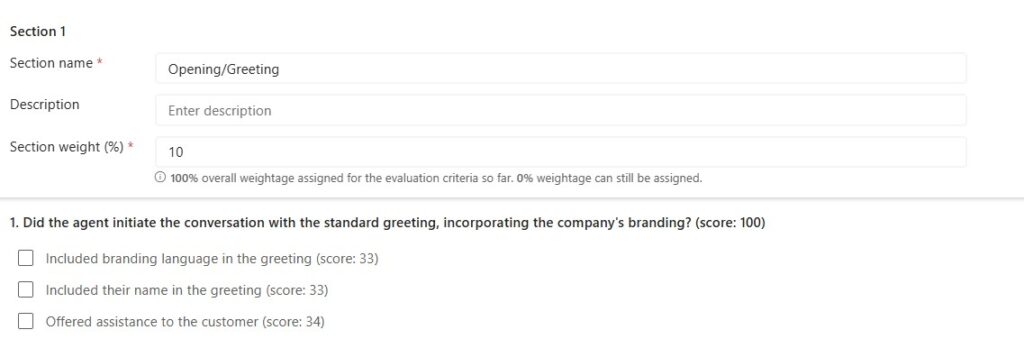
It checks whether the representative:
- Included the company’s branding in the greeting
- Included their own name
- Offered assistance to the customer
In the example, this section has a lower weight of 10%, which makes sense for many quality models. The opening is important, but it is not usually the main indicator of whether the issue was handled well.
Section 2: Listening skills
This section evaluates how well the representative listened to, and understood, the customer.
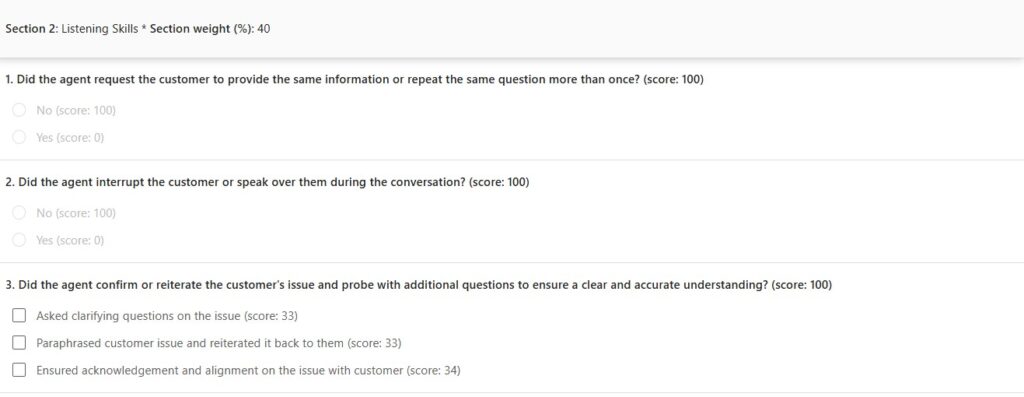
It checks whether the representative avoided asking the customer to repeat information unnecessarily, avoided interrupting or speaking over the customer, and confirmed and/or clarified the customer’s issue.
In the example, this section has a higher weight of 40%. That reflects how central listening and understanding are to a good service interaction.
Section 3: Communication skills
This section evaluates empathy and tone.

It checks whether the representative recognized and responded to the customer’s emotions, used positive and reassuring language, and avoided negative or defensive responses.
In the example, this section has a weight of 10%. Depending on the organization, this could be weighted higher, especially in industries where empathy and trust are core parts of the customer experience.
Section 4: Close of interaction
This section evaluates how the conversation was closed.
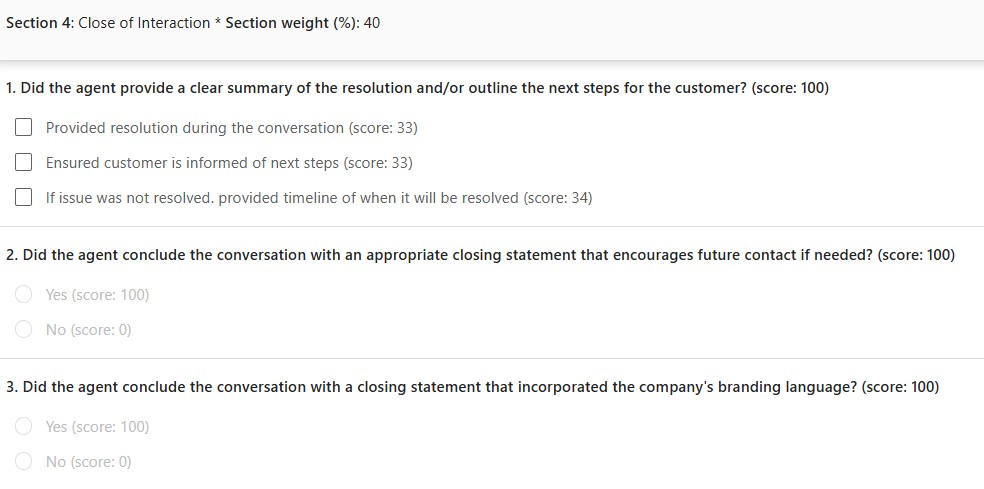
It checks whether the representative provided a clear summary or next steps, concluded the conversation appropriately, and included branding language in the closing statement.
In the example, this section has a weight of 40%, which makes the close of the interaction a major part of the total score. This is useful when resolution clarity and next-step communication are key quality indicators.
Language matters
One important detail is language.
Existing criteria are in English, and the language cannot be changed after criteria have been saved, not even while still in draft. That means if your contact center operates in another primary, or secondary language, you should create separate criteria for that language. A practical way to start is to copy the out-of-the-box criteria and translate or adjust the copied version before publishing it.
This is also important because evaluation results are returned in the same language as the criteria.
Creating your own criteria
When creating custom criteria, you define the criteria name, add a description, map the language in which it’s to be used, and then add sections with grouped questions, answers and scoring logic.
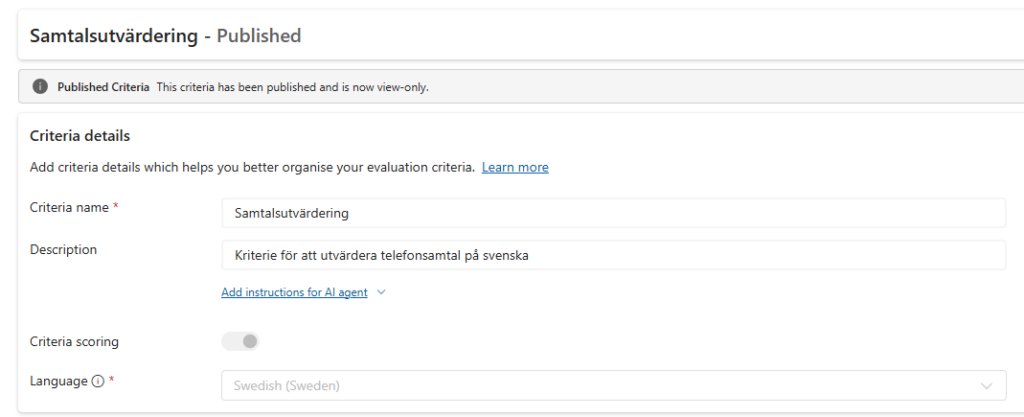
Each section needs a weight, and the total weight across all sections must equal 100%.
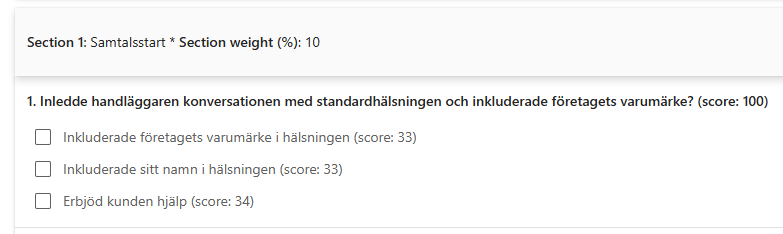
For each question, you can define answer options and scoring. Some questions can be simple yes/no questions, while others can have multiple answer choices. You can also create questions where several answer options contribute partial scores.
This is where you should spend time with the business.
The technical setup is not difficult, but the quality model needs to be thought through. The agent will evaluate based on what you define, so the questions need to reflect the behavior, compliance requirements, tone, and process steps that actually matter.
Marking critical questions
When creating your own criteria, you can turn on Mark as critical question to designate a question as critical. This is useful for mandatory requirements such as compliance, safety, identity verification, required disclosures, or process steps that must not be missed.
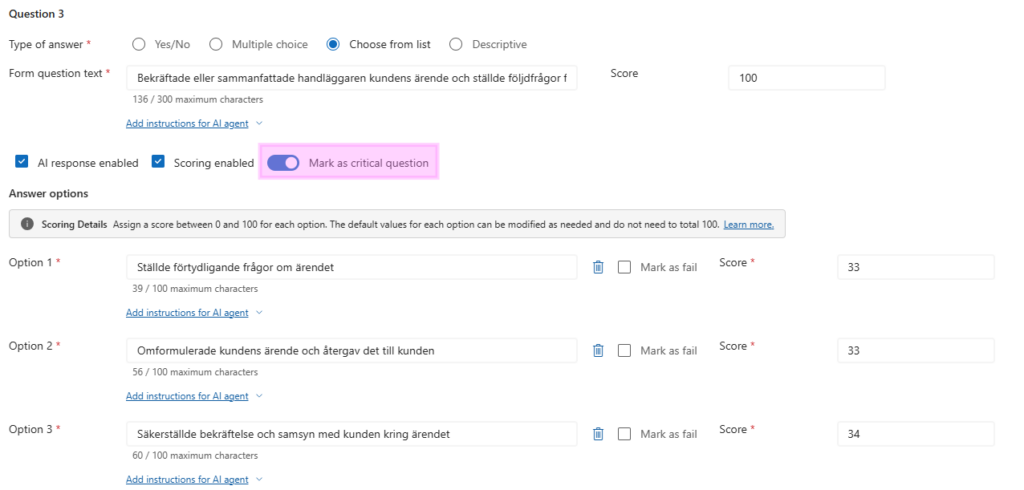
If a critical question is answered with a fail option, the entire evaluation or simulation fails. That makes critical questions powerful, but they should be used carefully. They are best reserved for requirements where a single failure should genuinely invalidate the interaction.
Versioning criteria
Each edit and publish action increments the evaluation criteria version.
The latest published version is always used for new evaluations. Supervisors can review prior versions, restore a previous version to make it current, or discard draft changes if needed.

This is useful because quality models often evolve. You may start with a basic evaluation structure and refine it as supervisors review results, calibrate scoring, and identify gaps in the original criteria.
Testing criteria with simulation
Before relying on criteria in production evaluations, supervisors can run a simulation test.
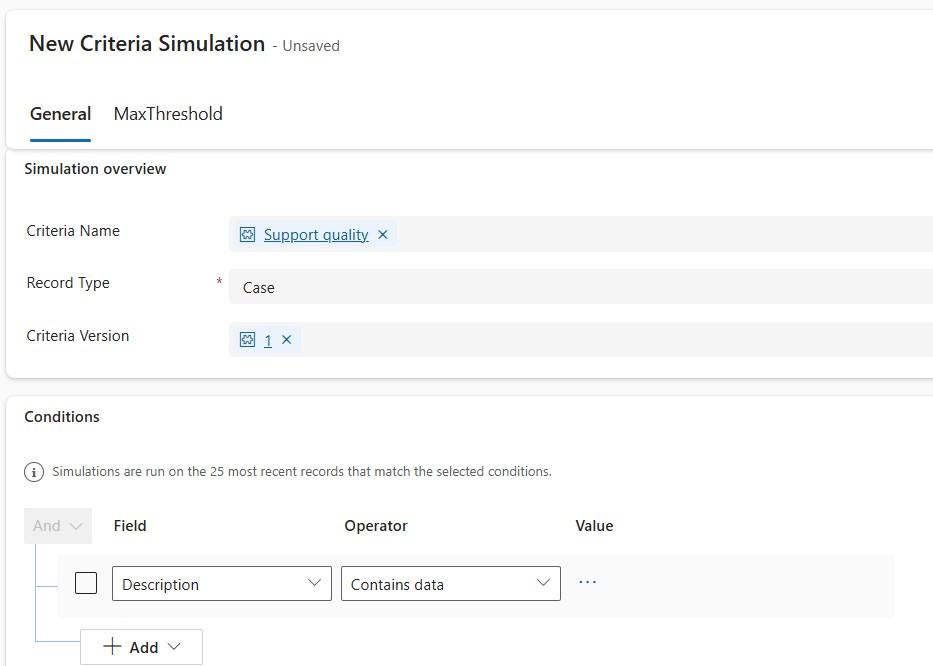
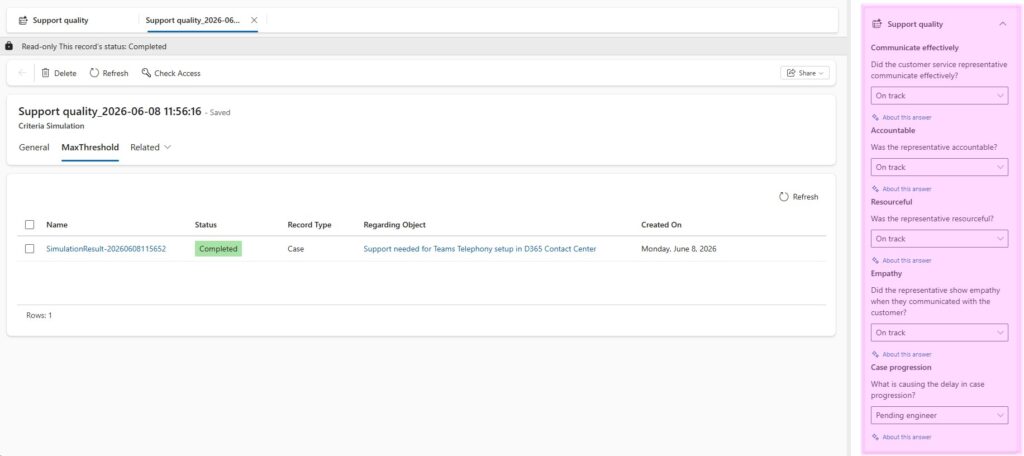
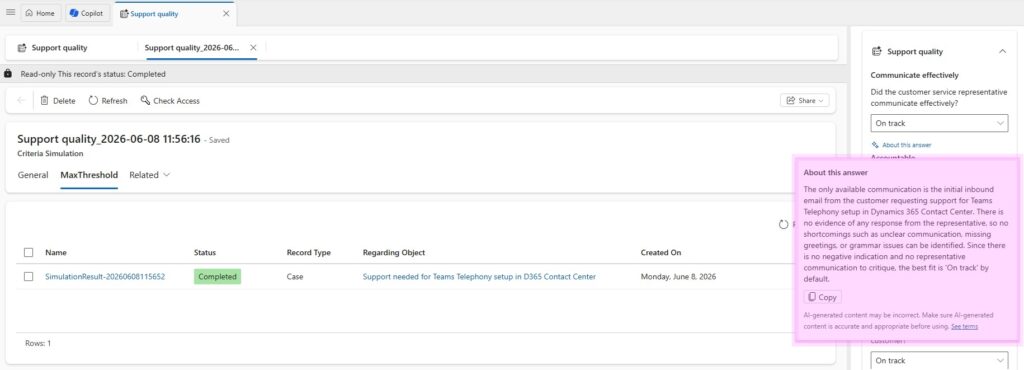
Simulation lets you select criteria in Draft or Published state and test it with real case or conversation data. This allows you to preview the Quality Evaluation Agent’s predicted outcomes before using the criteria more broadly.
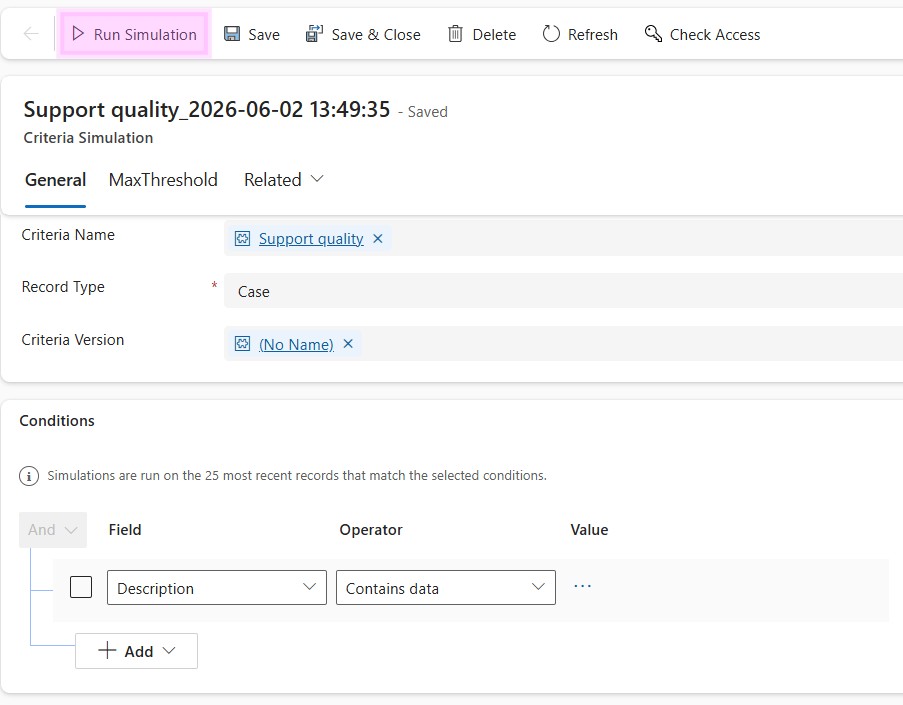
This requires the QEA Simulation flow to be turned on.
Simulation is especially useful when you are designing new criteria, adjusting section weights, changing scoring logic, or translating criteria into another language. It gives you a way to validate whether the AI output aligns with supervisor expectations before the criteria is used operationally.
Creating evaluation plans
Evaluation plans define when and which interactions should be evaluated, and which criteria should be applied.
You can use evaluation plans to create a systematic quality review process. For example, a plan can evaluate selected closed conversations, cases, or emails based on defined conditions. This helps move quality review from manual sampling to a more consistent and repeatable process.
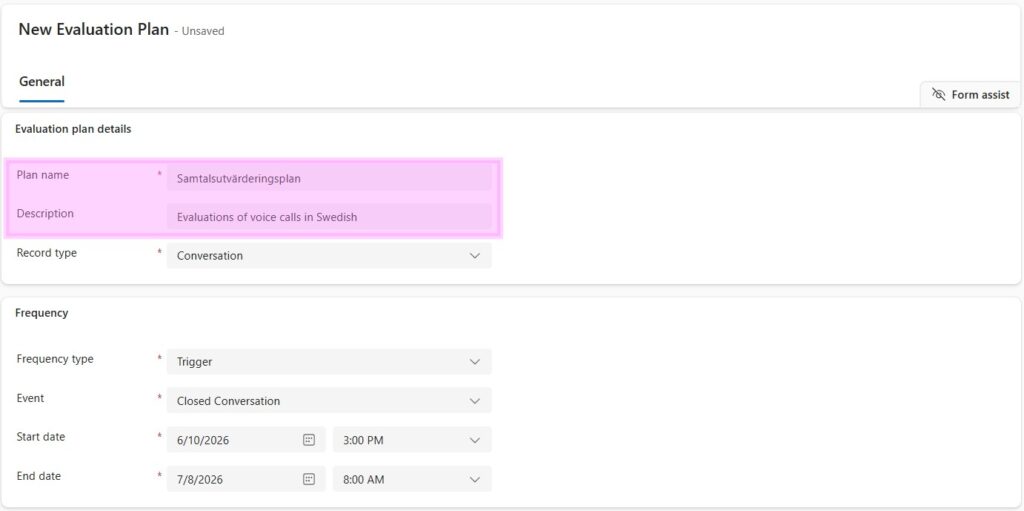
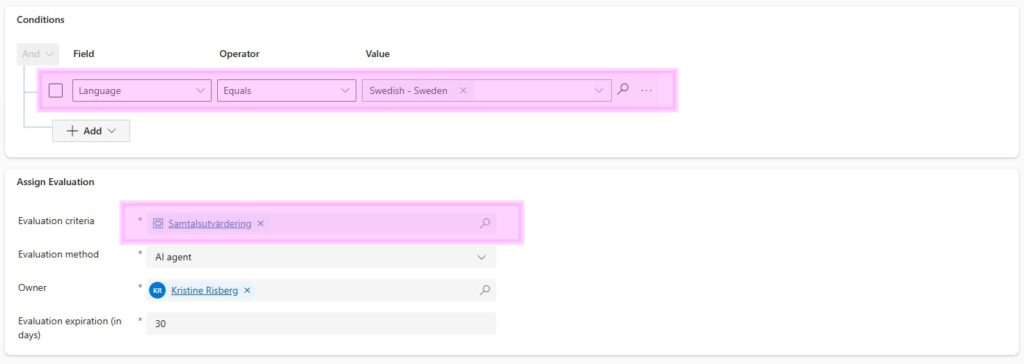
When setting up an evaluation plan, you typically define:
- The record type to evaluate
- The evaluation criteria to apply
- The conditions that identify eligible records
- The evaluation method
- The frequency or trigger
- Whether evaluations should be created in bulk
Evaluation plans are useful when you want predictable review coverage. On-demand evaluations are better when a supervisor wants to evaluate a specific case, conversation, or email outside of a recurring plan.

Viewing performed evaluations
To view evaluations, go to Copilot Service workspace → Evaluations.
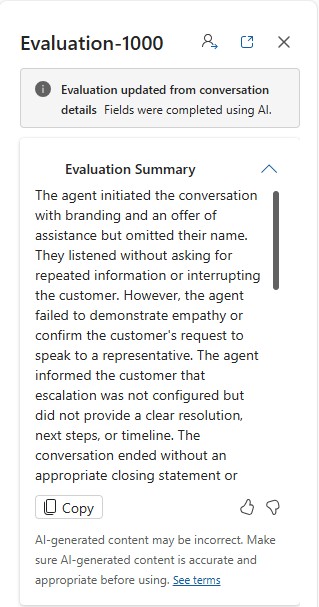
The All evaluations grid shows completed and ongoing evaluations. You can filter by fields such as evaluation name, score, evaluation method, AI agent status, evaluator status, evaluation criteria, evaluator expiration date, and evaluator completion date.

When you open an evaluation, the details appear in the side pane.
If scoring is enabled, the evaluation can include:
Evaluation Summary
A summary of the result, including improvement areas and coaching opportunities.
Suggested actions
Recommended follow-up actions or improvements.
Scoring overview
The overall score, total score, and scoring ratio.
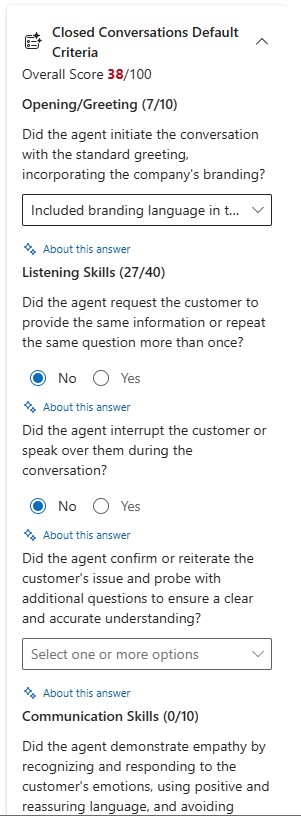
If you extended evaluation criteria, you can also see details for both source criteria evaluation and extended criteria evaluation. Evaluation results are returned in the language in which the criteria were created.
Using the Quality Evaluation Agent in D365 Contact Center
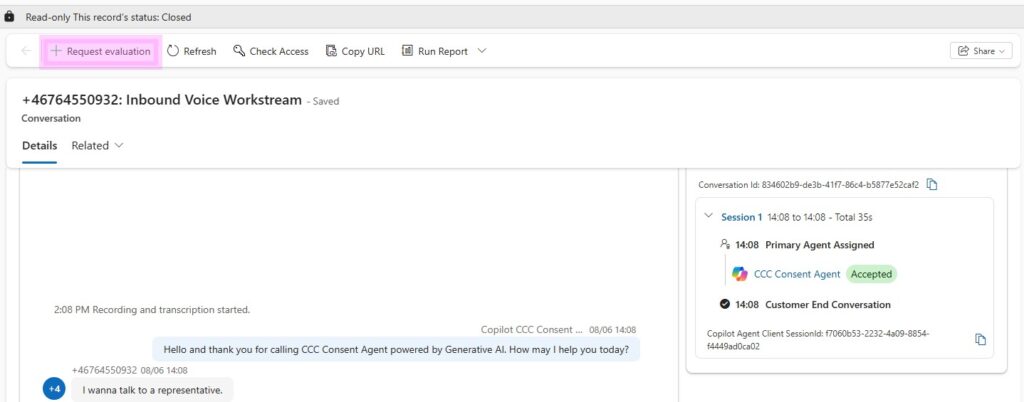
Aside from running Evaluation Plans, individual evaluations can also be requested directly from a closed conversation. The + Request evaluation button is available on the closed conversation form.
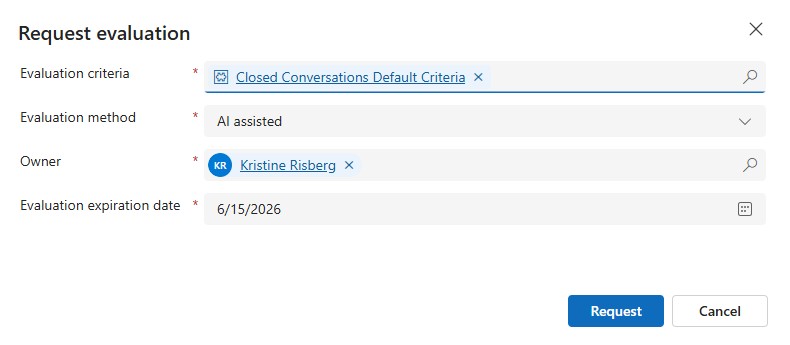
When manually requesting to run an evaluation, you need to specify against which criteria you want to do the evaluation.
Using the QEA in a non-English language
As a native Swedish speaker, and as an implementation partner working primarily with clients in Northern EMEA, geographical availability and language support are two important factors when testing and rolling out new features. For that reason, I wanted to test how well the Quality Evaluation Agent performs in a non-English language.
For my test, I created an evaluation plan for voice calls with the condition that the conversation language equals Swedish. The calls were evaluated using the criteria Samtalsutvärdering, which is a localized copy of the English Closed Conversations Default Criteria.

The generated summary does a very good job of understanding the full context of the call, from initiation to closure. It highlights relevant details based on the evaluation criteria, while also pointing out sections or actions that stood out during the conversation.
From a language perspective, the output is understandable and useful, but somewhat generic. In some places, it is clear that the Swedish wording is a direct translation from American English. The business language feels more American than Scandinavian, and it does not always match how a Nordic organization would naturally phrase this type of feedback. Despite that, the meaning is clear, and the suggested actions are presented in a way that is easy to follow.
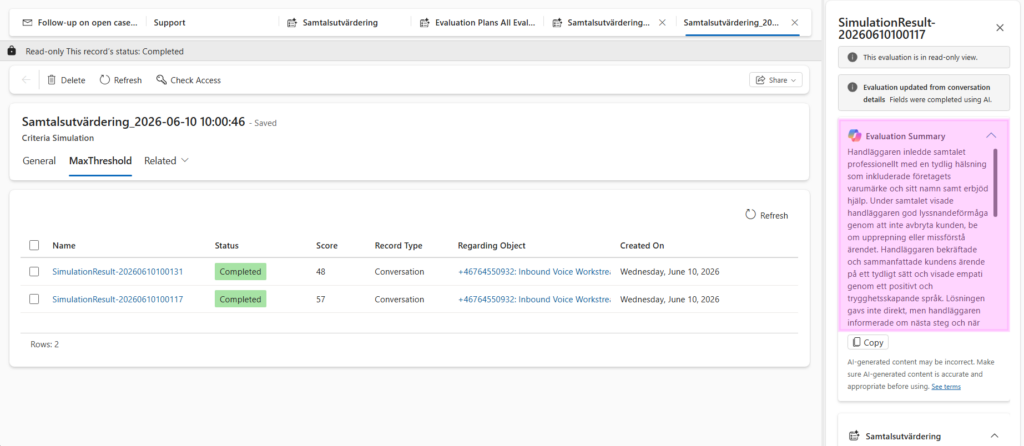
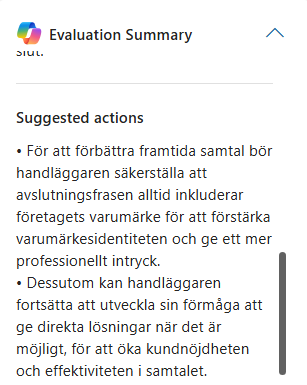
The suggested actions are also somewhat generic. For example, a recommendation such as “the CSR could work on their ability to give direct solutions” does not provide much detail about what practical action the supervisor should take. However, I would not expect the Quality Evaluation Agent to define the exact coaching action on its own. It does not know the organization’s preferred coaching model and internal processes, or what type of improvement activity would be most appropriate. Instead, I see this as a way to highlight where supervisor attention is needed, leaving it to the supervisor to decide the right follow-up action.
Each criterion is evaluated thoroughly, and the “About this answer” feature is especially useful. It allows the supervisor to drill into each answer and better understand the agent’s reasoning, including why a specific score was given. This makes the evaluation more transparent and helps build trust in the result.
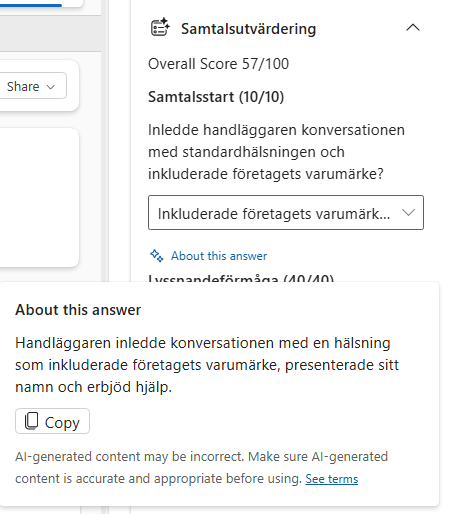
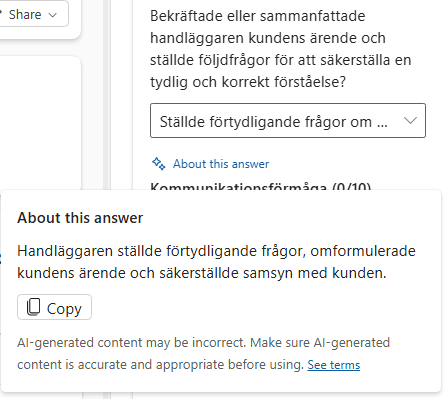
Overall, I am just as impressed with the Quality Evaluation Agent in Swedish as I am in English. The localization is not perfect, and organizations may still want to adapt criteria, wording, and coaching processes to fit their own language and culture. But from a functional perspective, the agent understands the conversation well, applies the criteria consistently, and provides a useful starting point for quality review and coaching.
Final thoughts
The Quality Evaluation Agent is not just a scoring tool. It introduces a structured way to define quality, apply it consistently, and use AI to support supervisors or other personas in reviewing customer interactions.
The most important work is not the technical setup. It is defining useful evaluation criteria. If the criteria are vague, the evaluations will be vague. If the criteria are clear, measurable, and aligned with the organization’s quality model, the agent can become a valuable tool for coaching, compliance follow-up, and continuous improvement.
My recommendation is to start small: copy one of the out-of-the-box criteria, adjust it to your language and operating model, run simulations, review the results with supervisors, and only then move into broader evaluation plans.
Good luck in setting up your own criteria and evaluation plans! Please reach out if you have any questions or need assistance or a peer-review.
Lämna ett svar