
Overflow handling in contact centers is usually based on time or volume. A customer waits for a certain number of minutes, or the queue reaches a defined threshold and only then does the overflow action trigger.
That works for many scenarios, but it has one important limitation: the customer still has to wait until the threshold is reached, even when no eligible service representative is actually available.
This is where AI-powered playbooks in conversation orchestration become interesting.
With this preview feature in Dynamics 365 Contact Center, you can configure orchestration logic that works beyond the initial work classification and queue assignment rules. Instead of only applying fixed rules at specific points in the conversation journey, conversation orchestration can evaluate the conversation as conditions change and apply business logic in real time.
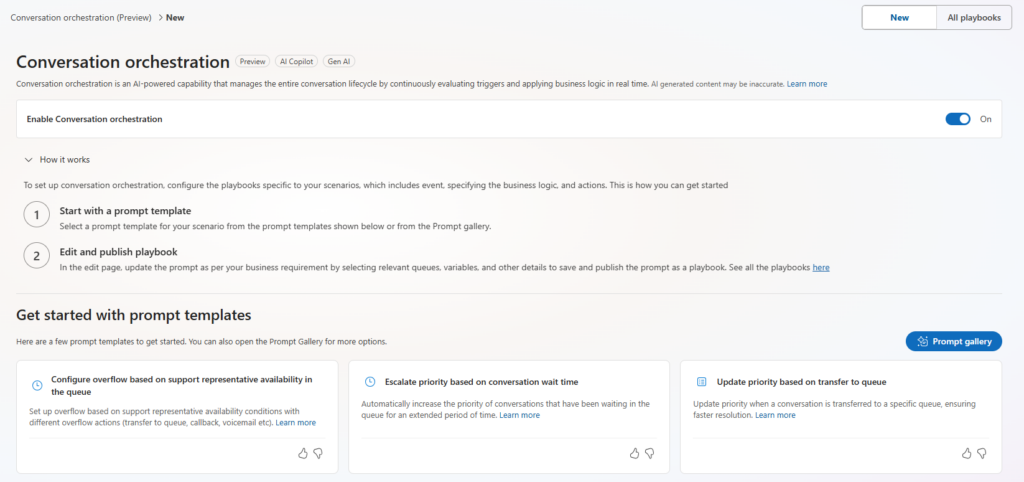
The feature is available in Copilot Service admin center → Customer support → Conversation orchestration. It currently includes three predefined prompt templates:
- Configure overflow based on support representative availability in the queue
- Update priority based on transfer to queue
- Escalate priority based on conversation wait time

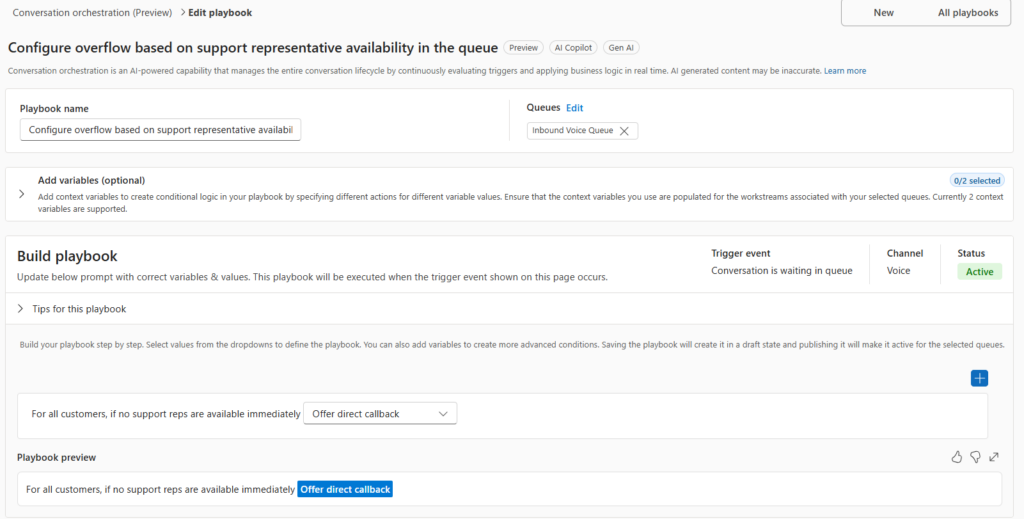
For my scenario, I used the template for overflow based on support representative availability. The playbook can be configured for selected queues and evaluates whether a service representative matching the assignment criteria is available. If no eligible representative is available, the configured action can run immediately.
Supported actions include transfer to queue, end conversation, direct callback, voicemail, and transfer to an external number.
The key difference compared to traditional queue overflow rules is timing. Instead of waiting for queue time or queue volume to build up, the conversation can be evaluated as it enters the queue. If no eligible representative is available, the customer can immediately be offered a callback or transferred to another unit.
You can add variables to determine which customers are to be affected by the conditional logic. Currently two context variables are supported and you need to ensure that the same variables are added to the workstream(s) associated with the queue(s).
Why this matters
This is especially useful for smaller teams that staff real-time channels with only one or two representatives. One operating unit I work with uses D365 Contact Center like the rest of the organization, but their staffing model is different. They often have only one or two CSRs available for real-time channels, and they also handle physical drop-in appointments at reception. Those in-person appointments always take priority over digital and phone channels.
Previously, handling this required operational workarounds. We had to adjust representative assignment using custom statuses and exclude certain statuses from the workstream, plan heavier load staffing in WFM, or manually change queue opening hours to trigger forwarding to another unit. None of those options were ideal. They worked, but they were time consuming and depended on manual operational discipline.
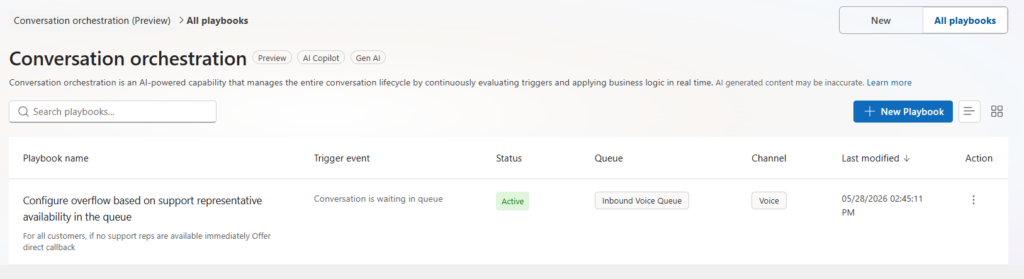
With AI-powered playbooks, this can be handled more dynamically. By publishing a playbook triggered when a conversation is waiting in queue, we can check whether any eligible support representative is available. If not, the system can immediately offer a direct callback or forward the call to another extension.
The practical value
For this type of team, the feature is small but important.
- It reduces unnecessary wait time.
- It avoids queue accumulation when no one is available to answer.
- It removes some of the manual work around temporary forwarding.
- And it gives customers a faster alternative instead of waiting in a queue that cannot currently be served.
It is also relatively easy to configure, which makes the value-to-effort ratio strong.
The important thing is to understand that this is not just “another overflow rule.” Traditional overflow reacts after a threshold has been reached. Immediate overflow with AI-powered playbooks reacts to representative availability at the point where the conversation enters the queue. For small or variable-staffed teams, that difference can have a real impact on customer experience.
Because the playbook can act immediately, it should be scoped and tested carefully. Make sure it applies only to the intended queue or channel, and validate the customer experience for each configured action before publishing it broadly.
Lämna ett svar