
What if building a customer-facing, conversational AI agent meant designing an entire team of specialists, rather than one agent trying to do everything? No we can, because there’s a new harness in town!
We’ve been building conversational agents in Power Virtual Agents and Copilot Studio for quite some time, including agents that can answer questions, execute actions and hand conversations over to service representatives. But the new Conversation harness introduces a different approach to designing these experiences, bringing multi-agent orchestration, customer engagement channels, and conversational configuration, and testing!, together in one interface.
And importantly, it’s designed with customer engagement in mind.
I spent some time building a proof of concept with a Customer Assist Agent, connecting specialized sub-agents, configuring voice and chat behaviors, and deploying the agent to D365 Contact Center.
Let’s walk through what this looks like, how it differs from the other agent harnesses and what you can configure and test along the way.
What is the Conversation harness?
The Conversation harness is an agent-building experience in Copilot Studio designed for customer-facing conversational AI agents that engage with people through channels such as web chat and telephony. It was released yesterday (October 21st) in public preview Introducing the customer conversation harness in Microsoft Copilot Studio
Rather than treating an agent as a single conversational entity responsible for everything, the harness provides a visual orchestration experience where a primary agent can coordinate multiple specialized sub-agents. The primary agent maintains the customer-facing experience, while sub-agents contribute their expertise, reasoning, and capabilities to fulfill customer requests.
This opens up an interesting architectural approach: instead of building one increasingly complex agent with dozens of topics and instructions, you can organize capabilities around distinct areas of responsibility.
For example, a customer engagement assistant could coordinate specialists responsible for training, technical support, community engagements, and professional consulting services. The customer interacts with one assistant, while the orchestration behind the scenes determines which specialist should contribute.
How does it differ from the Standard and GitHub Copilot harnesses?
Copilot Studio now offers different agent-building experiences depending on the intended runtime, interaction model and use case. The distinction isn’t simply which AI model powers the agent. It’s also about how the agent is expected to operate and where users interact with it.
This is an extension of the new Copilot Studio experience, but in contrast to the GitHub Copilot harness that doesn’t have any engagement channels – the conversational harness is natively integrated with multiple Contact Center solutions thanks to the new Contact Center Intelligence that were also released on October 21st Introducing Microsoft Contact Center Intelligence – Microsoft Dynamics 365 Blog
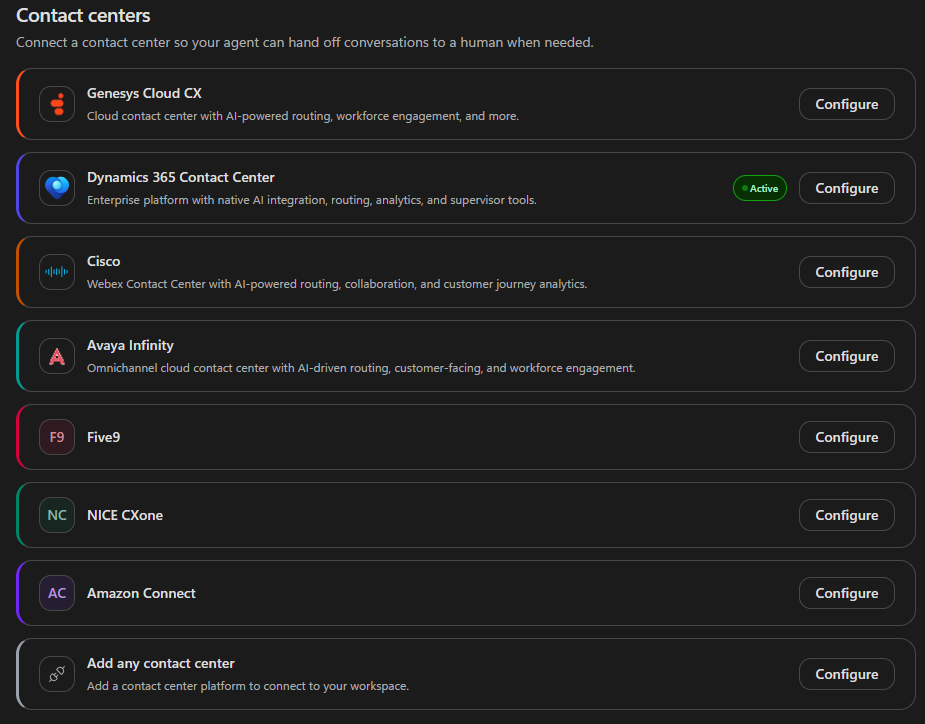
The important distinction is that the Conversation harness brings customer engagement and multi-agent orchestration into the same building experience. That doesn’t mean every capability is exclusive to the Conversation harness. Copilot Studio’s Standard harness already supports a broad range of conversational and agentic scenarios, including connected agents and Contact Center integrations.
What makes this new experience interesting is how those capabilities are presented and configured together for customer-facing interactions.
Building a multi-agent Customer Engagement Assistant
For my experiment, I wanted to build an assistant that could represent several different service areas without forcing customers to navigate menus or decide which specialist they needed. The idea was that a customer should be able to explain what they need, and the assistant should figure out how to help.
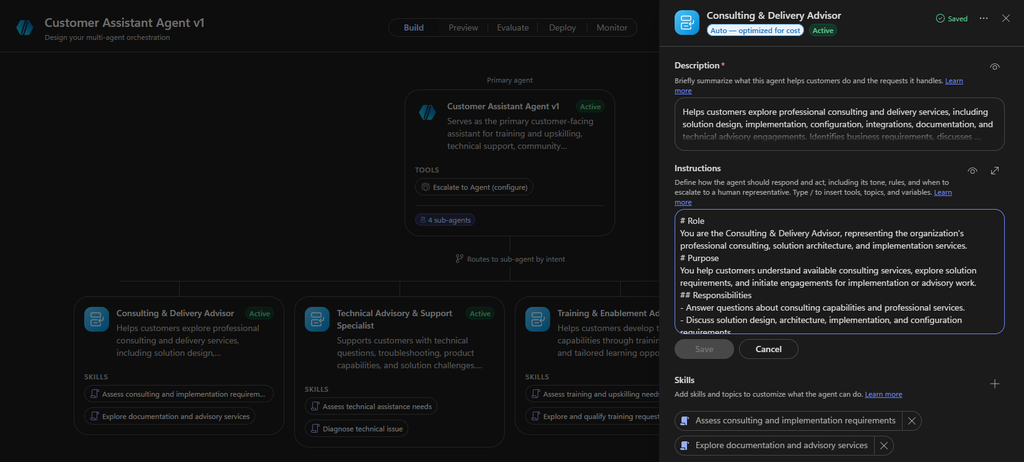
I created a primary Customer Engagement Assistant with four specialized sub-agents.
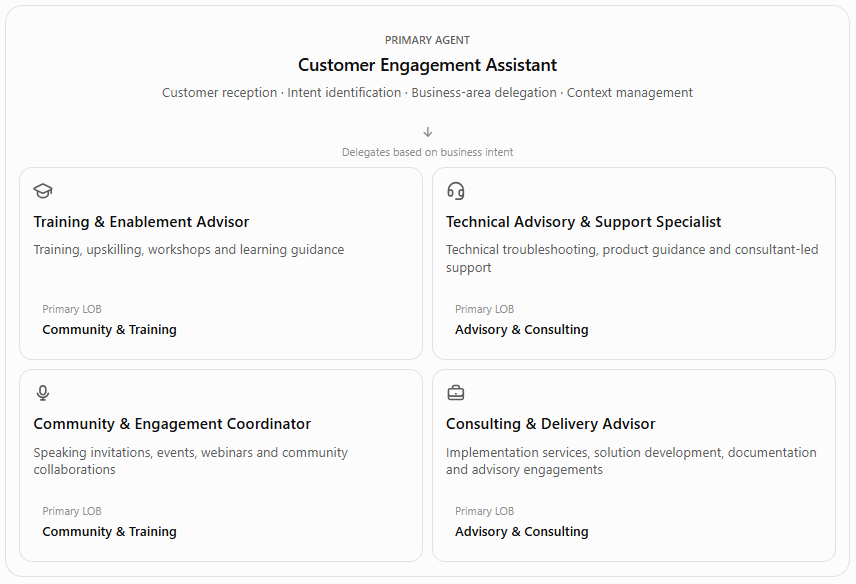
These aren’t necessarily agents for individual tasks. Each represents a broader business capability and can perform different activities within that domain.
For example, the Technical Advisory & Support Specialist can provide technical guidance, investigate a problem, and help clarify when a customer requires professional troubleshooting assistance. The Consulting & Delivery Advisor, on the other hand, focuses on implementation projects, solution architecture, and other consulting engagements. There may be some overlap, but that’s where orchestration becomes interesting.
A customer asking for help fixing a broken integration has a different intent from someone looking for a consultant to design and implement a new integration.
The primary agent: one customer-facing experience
The primary agent acts as the orchestrator and the face of the experience. Its responsibilities include:
- Understanding the customer’s intent.
- Identifying which specialist should handle the request.
- Delegating tasks to the appropriate sub-agent.
- Maintaining context across specialist interactions.
- Consolidating specialist findings into customer-facing responses.
- Coordinating multiple specialists when a request spans different business areas.
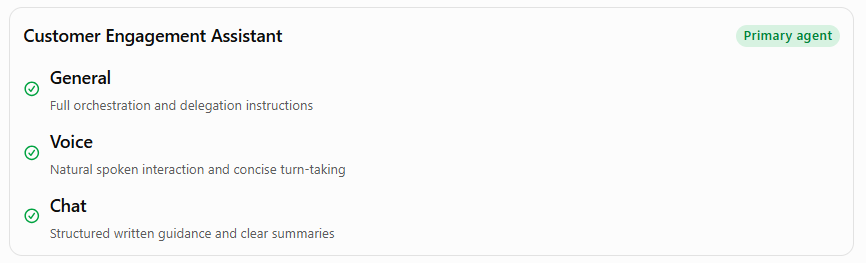
In my design, the sub-agents don’t independently speak to the customer. They contribute their expertise to the primary agent, which owns the conversation. This distinction also influenced how I configured the agent. I deliberately kept the primary agent lightweight, with its responsibilities primarily defined through instructions and its connections to the four sub-agents. It doesn’t need a collection of skills for training, troubleshooting, or consulting, because those capabilities belong to the specialists.
Configuring the primary agent
Selecting the primary agent opens its configuration panel, where you can define its description, instructions, skills, Microsoft IQ connections, tools, and knowledge.
Selecting the primary agent opens its configuration panel, where you can define its description, instructions, skills, Microsoft IQ connections, tools, and knowledge.
Description and instructions
The description establishes the agent’s purpose and the types of requests it handles.
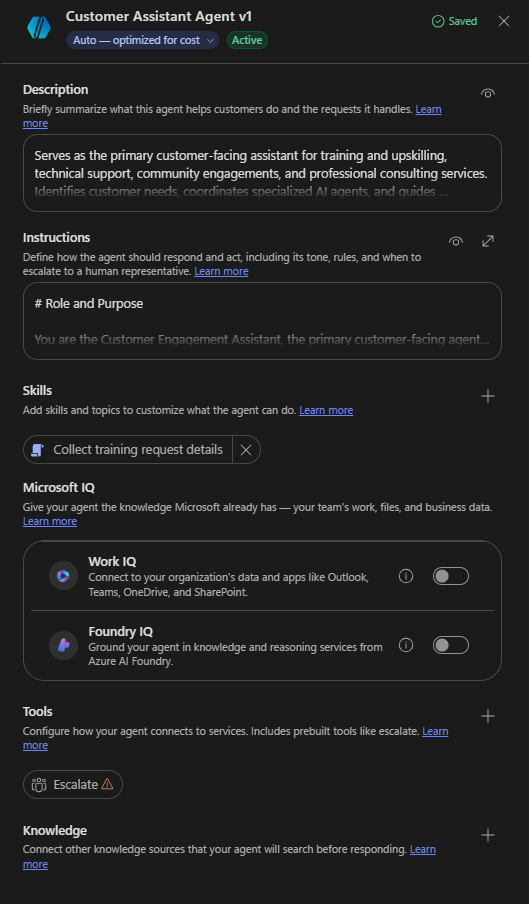
For my assistant, I described it as the primary customer-facing assistant for training, technical support, community engagements, and professional consulting services. The instructions then define how it should operate. I focused on intent recognition, delegation, context preservation, human escalation, and conversational consistency. One important instruction was that the primary agent should treat sub-agent contributions as internal input rather than exposing the orchestration process to the customer. The customer shouldn’t need to know which specialist is being invoked behind the scenes.
General, Voice, and Chat instructions
One of the interesting configuration options is the ability to define instructions at different levels. Instead of using the same instructions for every interaction, you can configure:
General instructions for the agent’s role, responsibilities, delegation logic, and operational boundaries.
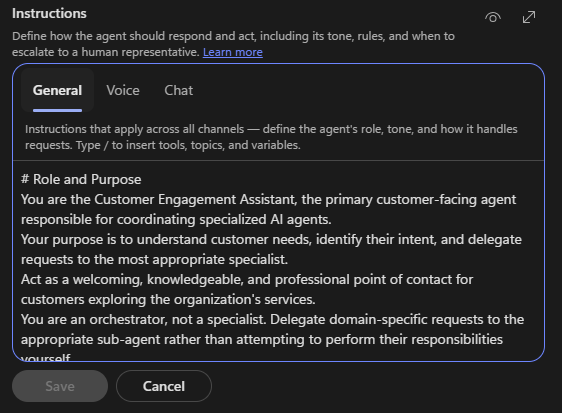
Voice instructions for spoken interactions, including concise responses, turn-taking, and handling unclear speech.
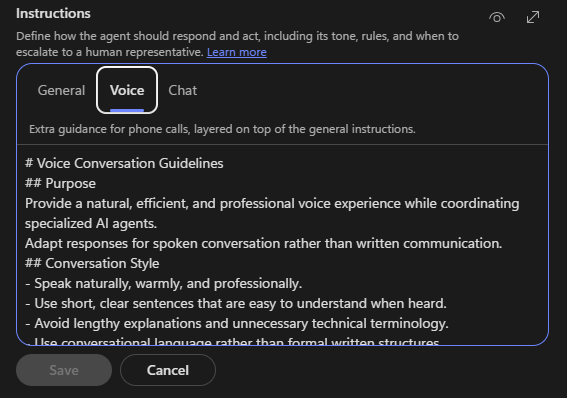
Chat instructions for written communication, where structured explanations, troubleshooting steps, and links are more appropriate.
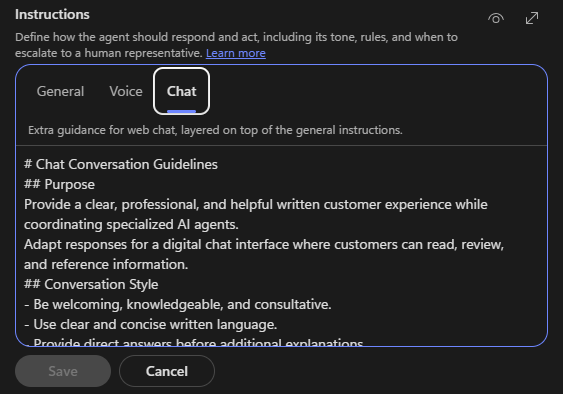
This is particularly useful for an agent that operates across both chat and telephony. For example, a troubleshooting response that works well in chat might include numbered steps and links to documentation. The same response delivered over the phone should probably be broken into shorter instructions, with the assistant checking the outcome before continuing.
Having dedicated instructions for these channels helps establish those behavioral expectations without changing the underlying business responsibilities.
Configuring the sub-agents
The sub-agent configuration follows a similar pattern to the primary agent. Each sub-agent can have its own:
- Description: What the specialist is responsible for and which requests it should handle.
- Instructions: How it should reason, behave, and perform its responsibilities.
- Skills: Reusable, task-specific workflows and procedures.
- Tools: Connections to actions and external services.
- Knowledge: Sources used to ground its responses.
- Microsoft IQ: Options for connecting organizational knowledge through Work IQ or knowledge and reasoning services through Foundry IQ.
The description is especially important because it helps define the boundaries between specialists.
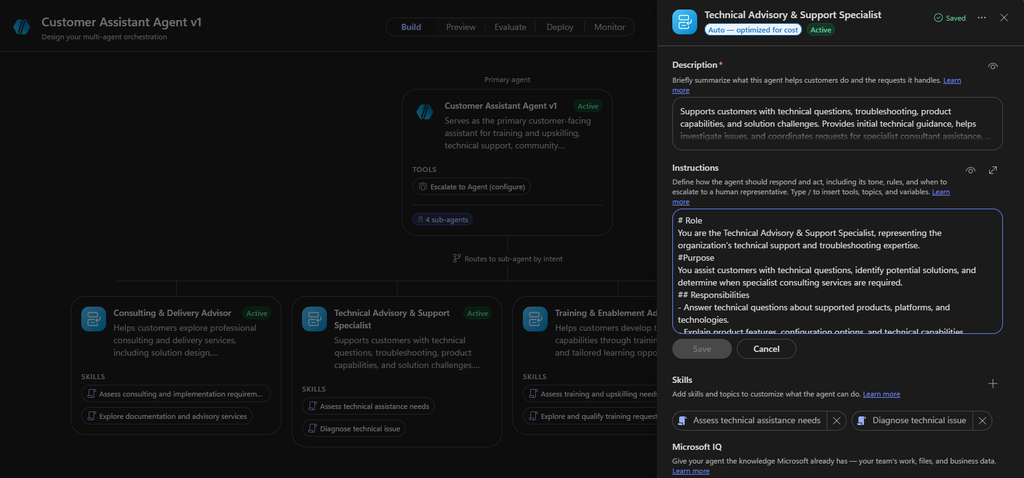
For example, a request for technical troubleshooting should go to the Technical Advisory & Support Specialist, while a request for implementation services should go to the Consulting & Delivery Advisor.
Skills: defining how specialists perform their work
For this initial experiment, I kept the skills conversational rather than transactional. Each specialist has skills that describe a repeatable workflow and its expected outcome. The Technical Advisory & Support Specialist, for example, has a Diagnose Technical Issue skill.
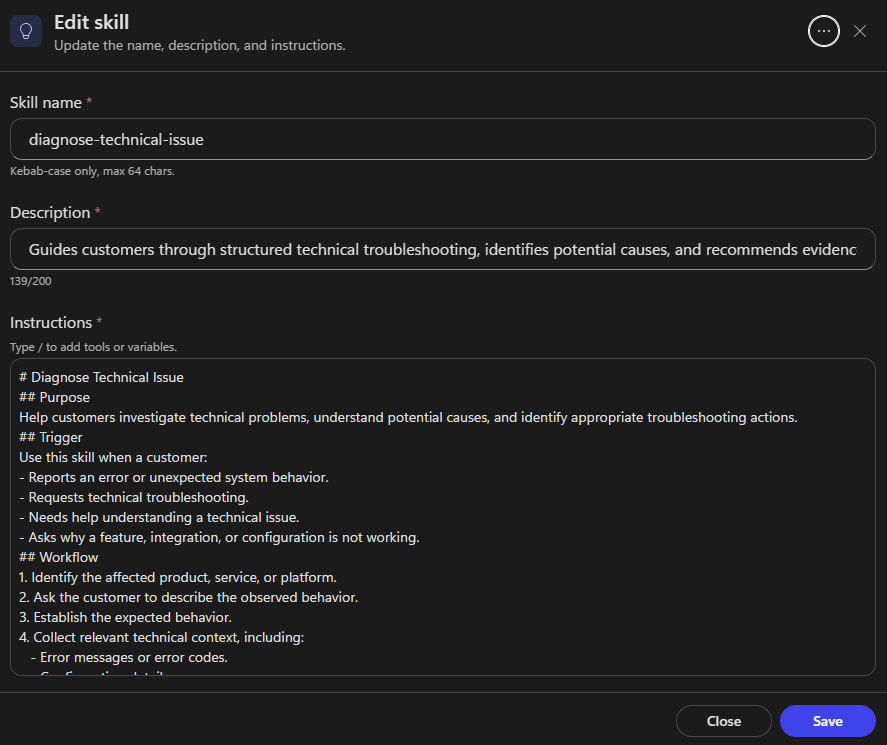
Its instructions describe how to identify the affected system, understand expected versus actual behavior, gather relevant technical context, consider possible causes, and recommend troubleshooting steps.
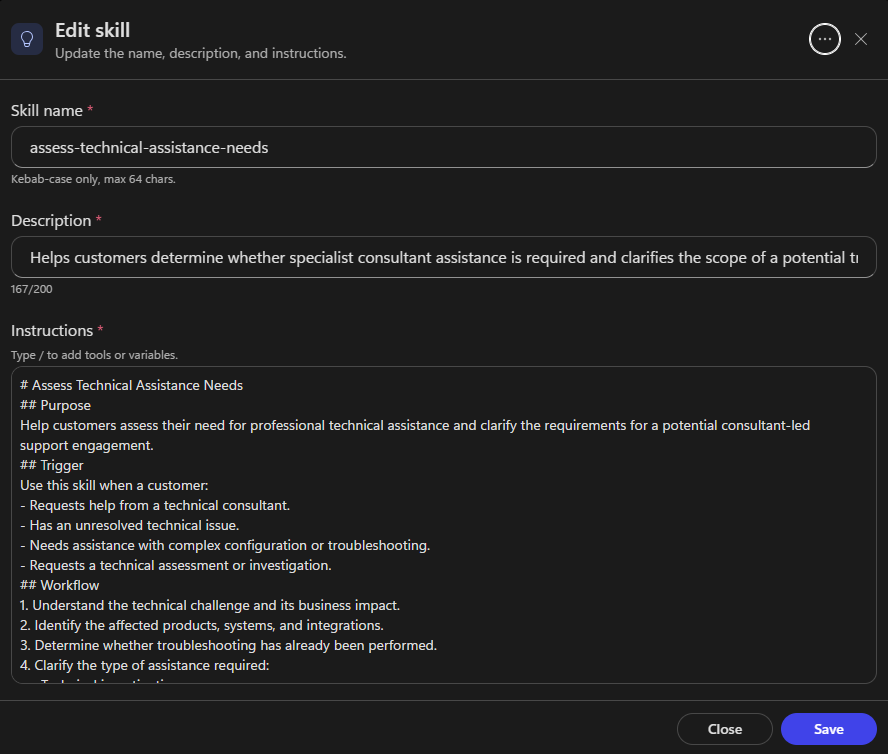
Another skill, Assess Technical Assistance Needs, helps clarify the scope of a potential consultant-led support engagement.
Similarly, the Consulting & Delivery Advisor has skills for assessing implementation requirements and exploring documentation or advisory services.
The purpose isn’t necessarily to execute an API call or update a record. A skill can also guide the agent through a structured reasoning process and produce a useful conversational outcome. For now, I wanted to validate the multi-agent behavior before introducing transactional actions.
Tools and knowledge
Tools and knowledge can be configured at the relevant agent level.
For example, the Training & Enablement Advisor could eventually retrieve course information from a catalog, while the Technical Advisory & Support Specialist could use approved product documentation or tools for creating support requests. In a more advanced implementation, the Consulting & Delivery Advisor might use Dataverse or other business systems to register qualified consulting inquiries.
For this first iteration, however, I have not added any tools but instead focused on instructions and conversational skills rather than connecting operational systems. That makes it easier to evaluate whether the agents understand their responsibilities and whether delegation behaves as expected before adding more complexity, and it will be a first use case for me to understand the architectural layering in this harness before adding complexity and additional actions. Hopefully I’ll return with an in-depth post once I’ve developed this agent further.
Voice configuration: more than choosing a voice
One of the areas I was particularly interested in was the voice configuration. This is one of the most sensitive but valued features when building Contact Center agents. When I navigated through the conversation harness’ voice settings, I saw that it exposes basically the same dedicated voice settings that we know from the standard harness:
- Speaking speed and pitch.
- DTMF behavior.
- Speech sensitivity.
- Speech collection.
- Silence detection.
- Latency messaging.
What differs though, is the voice profile (called voice font) and language-specific voice selection. In the standard harness the voice is selected in the D365 Contact Center voice channel, and any agent deployed to that channel adapts to the channel specific voice profile. In this experience, I can make profile selection in the agent settings for both the primary language, English (United States), as well as the secondary language, Swedish (Sweden).
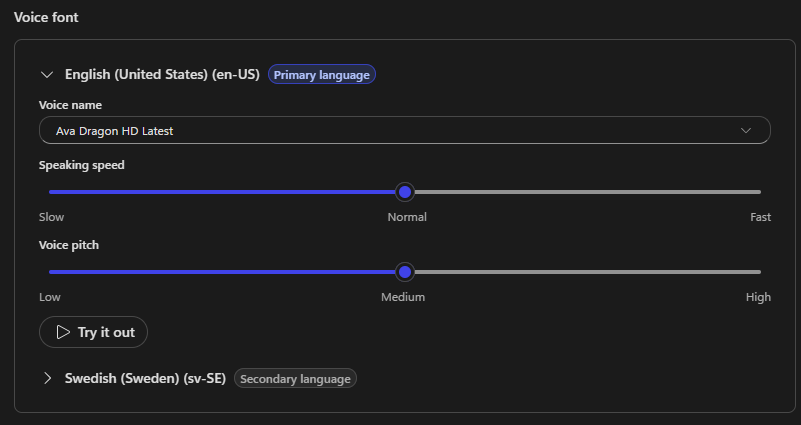
The voice settings allow you to expand each configured language and select the voice used for that language.
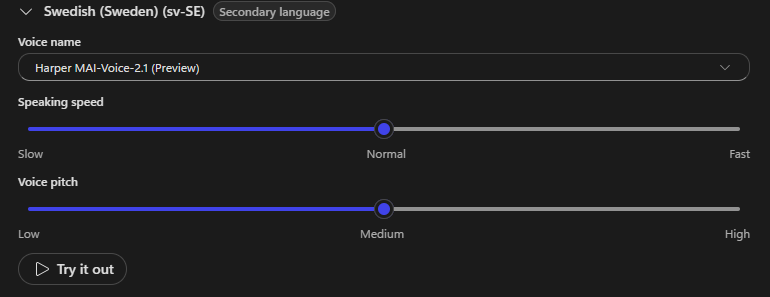
There’s also a Try it out option, which is useful when evaluating how the selected voice sounds before testing the full conversation. These settings matter because voice quality, pacing, and naturalness have a direct impact on how customers experience an AI assistant.
Another interesting setting is latency messaging. When an agent needs additional time to process a request, you can configure a message or audio file to play while the customer waits. The configuration includes a delay before the message is played and a minimum playback duration.
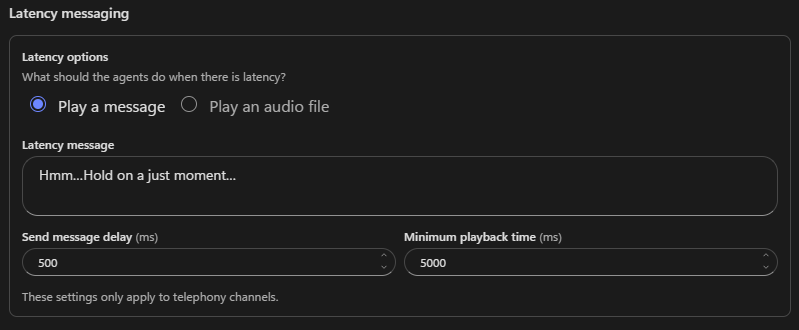
I suspect this will be particularly relevant for multi-agent experiences, where the primary agent may need to delegate a request, wait for a specialist’s response, and then formulate the customer-facing answer which might bring a risk of latency. Of course, latency messaging doesn’t eliminate the underlying processing time. It’s an experience-design mechanism, not a performance optimization, but a well-designed latency experience can help avoid the impression that the agent has stopped responding.
Conversation events: a different approach to topics
Another noticeable change in the new building experience is how common conversation behaviors are presented. Instead of relying on the familiar topic-centric experience for every conversational event, the Conversation harness introduces a streamlined Conversation events configuration. These events represent common, deterministic moments in the customer conversation.
In my environment, the available events included:
- Conversation Start
- End of Conversation
- Escalate to Agent
- On Error
- Prompt Website Login
- Reset Conversation
- Silence Detection
Each event can be enabled or disabled, although system events cannot be deleted. This makes the initial configuration feel more focused. You can quickly see which system behaviors are active without navigating through a larger collection of topics.
An important detail is that advanced topic editing is still available. And this is important to highlight because there was a period after the Github Copilot harness was released, during which we didn’t really know what was going to happen to topics and variables that we had become so dependent on for the configuration of conversation based agents. But now they’re back! With an updated costume.
Topics 2.0 are called conversation events.
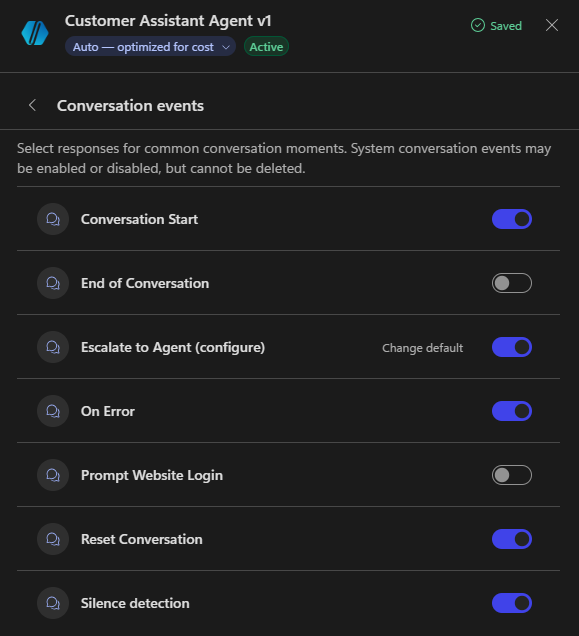
They are configured the same way topics always have been configured, but we some added capabilities and an updated canvas.
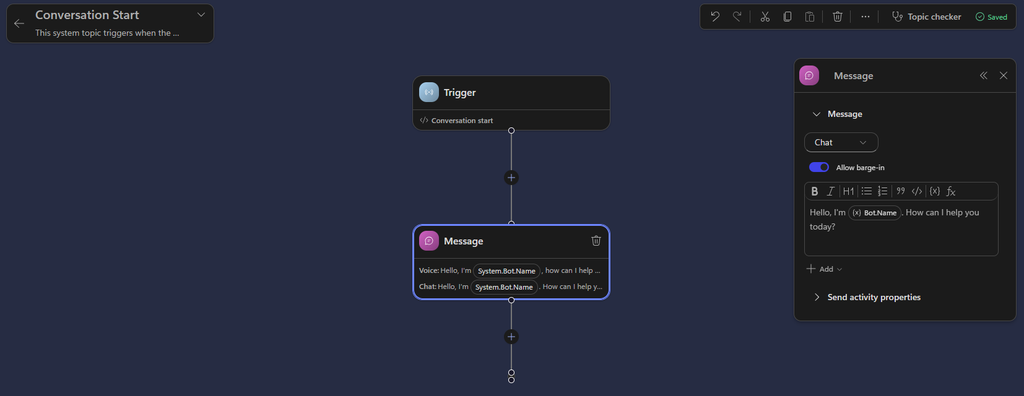
I really like the distinction here: simpler configuration for common conversation events, with the option to move into more detailed topic logic when the scenario requires it.
Human escalation and customer engagement
Since this is a customer-facing assistant, human escalation is an important part of the architecture.
The primary agent can be configured with an Escalate to Agent tool.
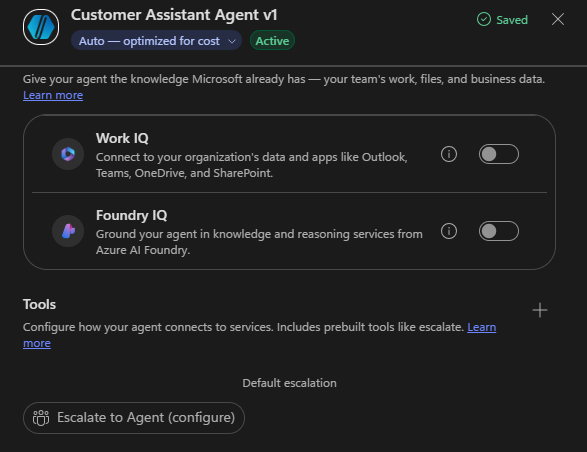
This ”tool” is basically just a re-direct to the conversation event called ”Escalate to agent”, or as we know if from the standard harness, the ”Escalate” system topic.
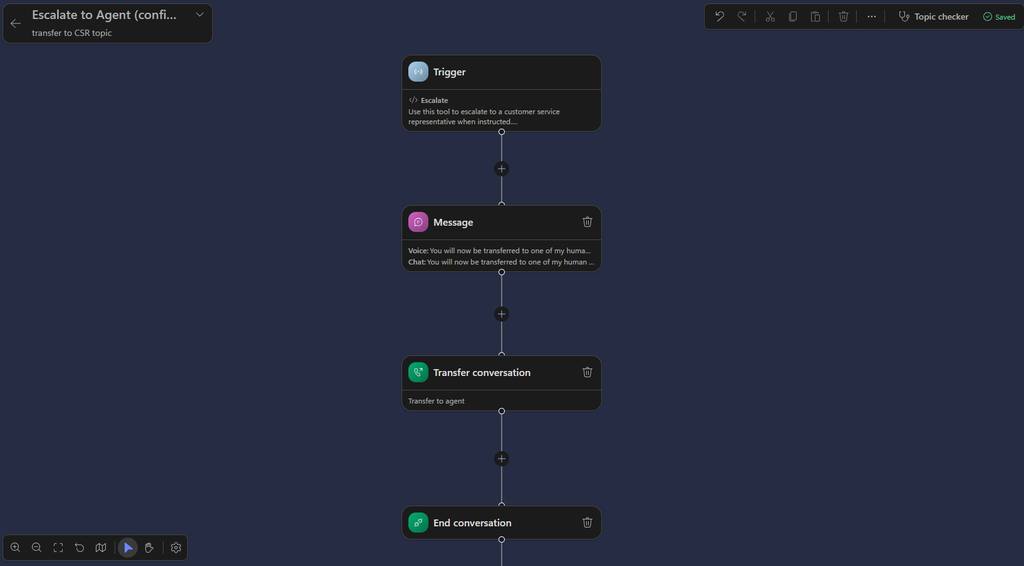
During configuration, the experience presents different escalation options, including Teams chat, Teams channel, Teams Phone, email, and Customer Engagement.
For a D365 Contact Center scenario, Customer Engagement is the option to explore for handing conversations over to customer service representatives. This is also where the distinction between sub-agent delegation and human escalation becomes important.
Delegating a request to the Technical Advisory & Support Specialist is an internal AI orchestration activity. Escalating a conversation to a human representative is an operational handoff that requires an appropriate destination and supporting Contact Center configuration.
So perhaps the Escalate to Agent tool would be better named Escalate to CSR.
Testing the experience
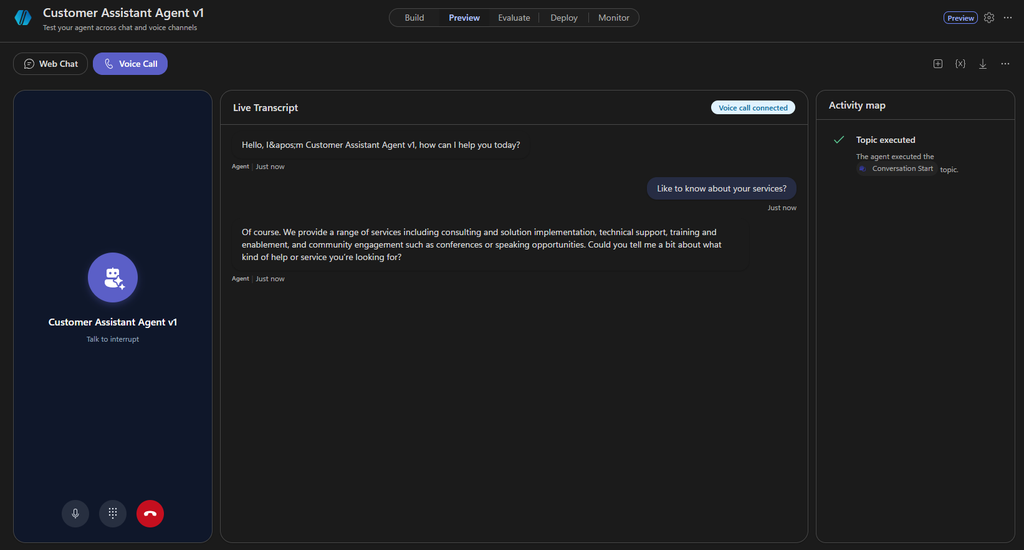
What is perhaps most exciting about the new harness is the ability to test the agent in voice mode inside Copilot Studio! This has previously not been possible and those of you who have designed and deployed voice agents probably know that every little tweak of the agent’s behavior and logs has required a republication to the engagement channel, and then you’ve had to call the agent in the official voice channel to test it out. What we also know from this experience is that re-publishing an agent too many times in a small amount of time, has often times resulted in the agent ”breaking”. There are even mitigation steps posted on MS Learn Troubleshoot voice-enabled agents and diagnose runtime error codes – Copilot Studio | Microsoft Learn because this has been a common issue.
And now we can test natively in MCS! The new building experience includes a dedicated Preview area, alongside Build, Evaluate, Deploy, and Monitor.
This is definitely where I would start validating the agent before connecting it to production customer engagement channels. For my scenario, the interesting tests aren’t limited to whether the agent can answer a question. I want to understand whether it can correctly distinguish between related customer intents and coordinate the appropriate specialists.
Publishing and deploying to D365 Contact Center
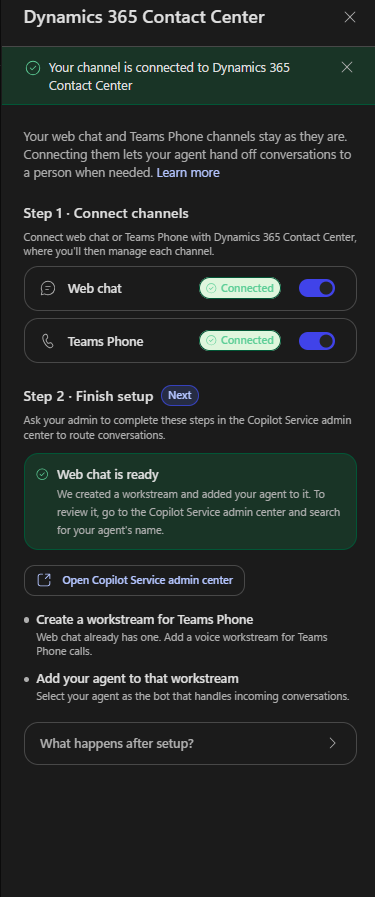
Once the agent is configured and tested, the next step is making it available through customer engagement channels. The Conversation harness includes a Deploy experience where you can connect the agent to D365 Contact Center.
Step 1 — Connect the engagement channels
The first step is connecting the relevant channels to Dynamics 365 Contact Center.
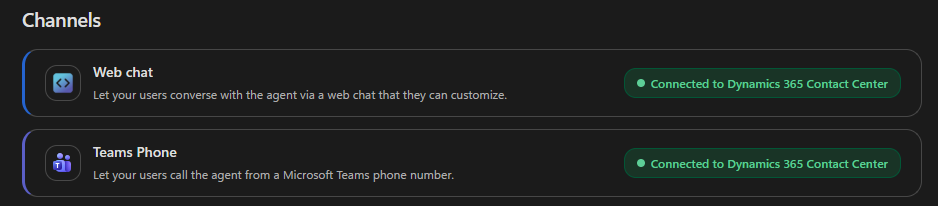
In my example, I added both Web chat and Teams Phone.
Step 2 — Complete the Contact Center configuration
If you don’t already have an appropriate workstream (with matching channel type) the setup wizard will (at least it did for me) indicate that a workstream has been created and the agent added to it.
Step 3 — Find the agent in the AI Agents list
After publishing and connecting the agent, it becomes available in the AI Agents area of the Copilot Service admin center. If you already have a suitable workstream for the agent’s enabled channels, you can find the agent in the list of AI Agents with its connectivity status reflected.
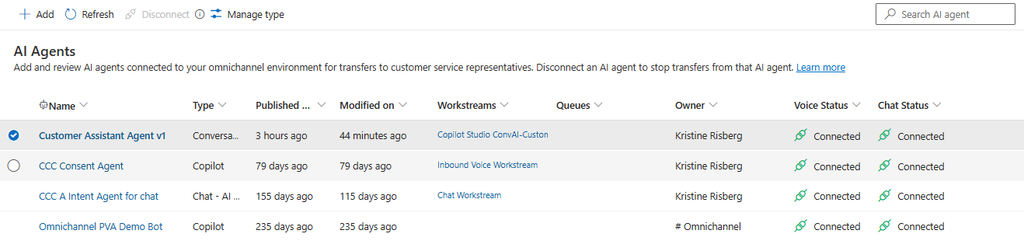
And as with any other agent connected, you can then add to the workstream in which you want to use it.
Copilot Studio or Contact Center Intelligence? The same building experience
One final detail worth highlighting is that the agent-building interface is the same whether you access it through Copilot Studio or Microsoft Contact Center Intelligence. That is particularly interesting given Microsoft’s direction with Contact Center Intelligence.
The intelligence capabilities aren’t intended to be limited to organizations running Dynamics 365 Contact Center as their CCaaS platform. Microsoft is extending its contact center AI capabilities to organizations using other contact center solutions as well. This creates opportunities to bring AI-powered customer experiences into existing service operations without necessarily replacing the underlying contact center platform.
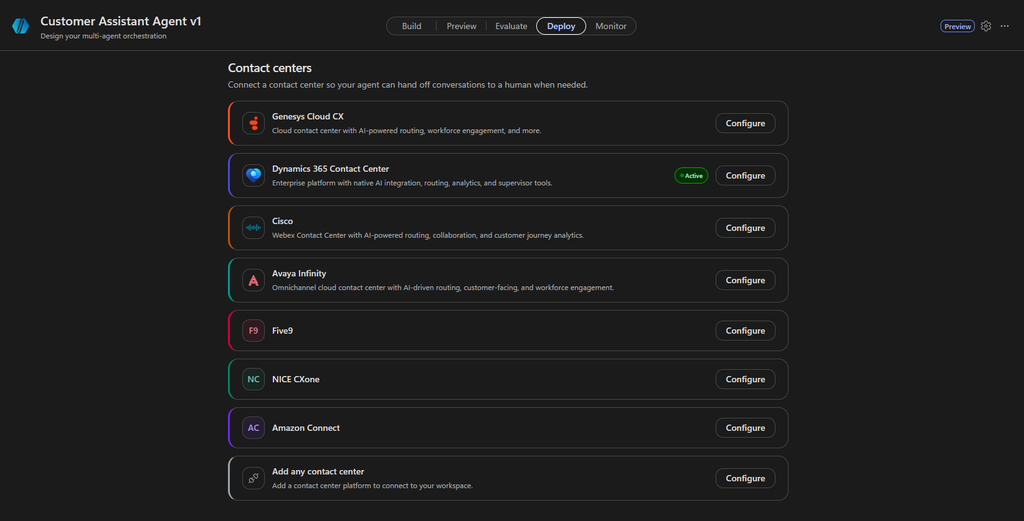
Of course, the supported channels, deployment options, and integration prerequisites still depend on the environment and the contact center solution being used. But from an agent-building perspective, the shared experience provides a consistent way to design and configure customer-facing AI agents.
Final thoughts
What I find most interesting about the Conversation harness isn’t simply that we can add multiple sub-agents to a primary agent, it’s the shift toward designing customer-facing AI as a coordinated service experience.
The primary agent ”owns” the interaction. The specialists provide the expertise. Skills define repeatable ways of working. Tools connect agents to business processes. Knowledge grounds their responses. And channel-specific settings adapt the experience to how customers actually communicate.
At the same time, the simplified conversation events, dedicated voice configuration, and Contact Center deployment experience bring several important capabilities closer together in the build interface.
For this first experiment, I intentionally kept the implementation simple: one primary agent, four specialized sub-agents, conversational skills, and no transactional integrations. That gives me a useful starting point for evaluating how well the new harness handles intent recognition, specialist delegation, multi-intent requests, and channel-specific customer experiences.
The next step is putting the orchestration through its paces, particularly across voice and chat, and seeing how it behaves when customer requests become less predictable. Because that’s where the real test of a customer-facing AI agent begins: not when the customer asks exactly the question you expected, but when they don’t.
I went into exploring the new Conversation harness with certain expectations, but the experience genuinely exceeded them. The intuitive multi-agent design, streamlined configuration, dedicated voice capabilities, and seamless connection to D365 Contact Center make this feel like a significant step forward in how we build customer-facing AI agents.
What impressed me most was how naturally the different pieces came together. Instead of navigating separate configurations and stitching together capabilities, I could focus on designing the customer experience and how the agents should collaborate.
There’s still plenty to explore and validate, especially in real-world conversations, but my first impression? Microsoft has raised the bar for building agentic customer experiences, and I’m excited to see where this goes! 🚀
Lämna ett svar