
As AI capabilities mature within Dynamics 365 Contact Center, one topic that increasingly surfaces in architecture discussions is prompt handling. Not all prompts are created equal. The difference between Microsoft’s default prompts, administrator-configured prompts in the Customer Service Admin Center (CSAC), and fully extensible Copilot prompt plugins is not cosmetic, it is architectural.
At its core, the distinction comes down to three attributes:
- Architectural control
- Data grounding
- Enterprise extensibility and governance maturity
Understanding these differences is essential when designing an AI-enabled contact center that aligns with security, compliance, performance, and long-term platform strategy.
Proactive prompts in the agent experience
Within the agent experience, Copilot offers proactive prompts that can be accessed via View prompts.
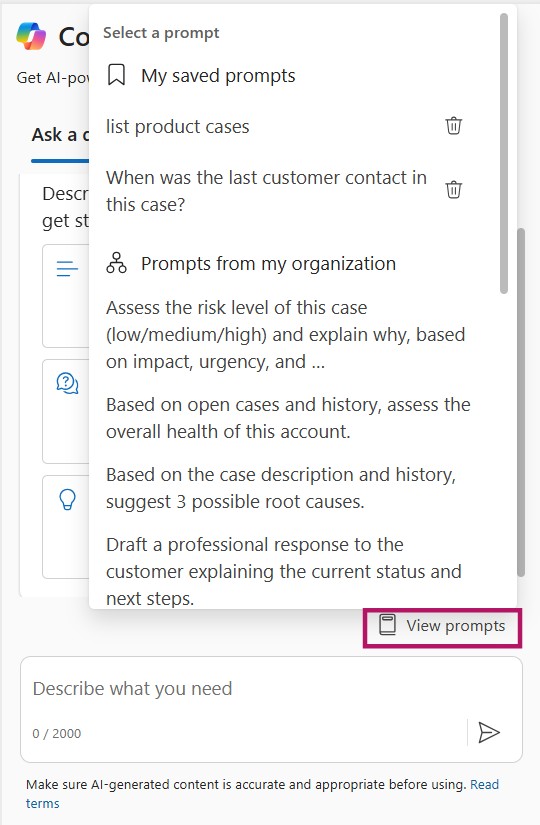
Agents can choose from:
- Default prompts
- Prompts configured by an administrator
- Bookmarked prompts
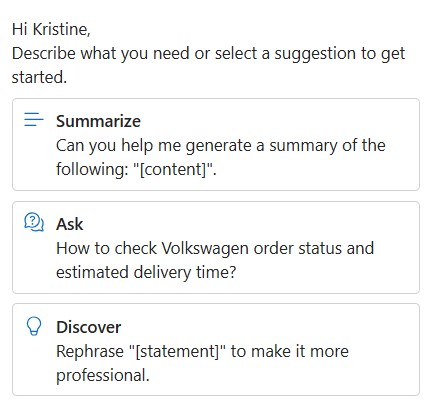
Out of the box, agents can immediately use prompts such as Summarize, Ask, and Discover to accelerate their workflow.
Copilot streams responses incrementally in the UI, allowing agents to see content as it is generated. Agents can stop the generation at any time and restart if needed.
Each response includes citation references showing the knowledge base articles or website sources used. Agents can inspect these sources inline using > Check sources, which increases transparency and trust in the generated output. The output can be edited as appropriate.
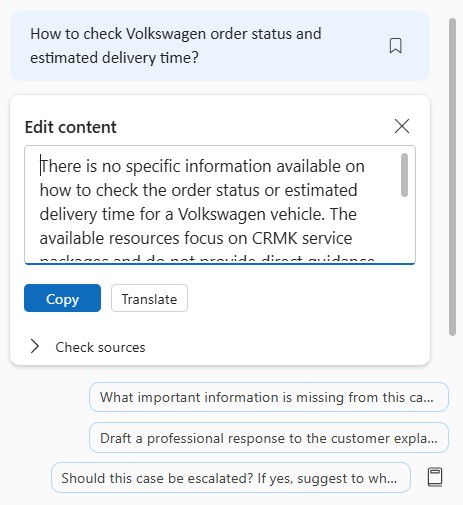
When satisfied with the response, agents can:
- Copy the full response or selected sections into chat (or use in voice conversations)
- Send the response directly to the customer
- Refine customer keywords to improve accuracy
- Share cited knowledge sources when appropriate
From the user perspective, this feels seamless. From an architectural perspective, however, what happens behind the scenes differs significantly depending on which type of prompt is being used.
Default prompts: AI as a built-in-feature
Default prompts are Microsoft-delivered capabilities that come preconfigured with Copilot. They power features such as:
- Case summarization
- Conversation summarization
- Suggested replies
- Knowledge suggestions
- Wrap-up summaries
These prompts are tightly integrated into the product and primarily grounded in:
- The active case record
- The live conversation transcript
- Standard related records through out-of-the-box relationships
They are designed to deliver immediate value with minimal configuration effort. Their key characteristics are that they are:
- System-managed
- Grounded automatically in case and conversation context
- Have limited customization
- Optimized for fast AI enablement
What You Cannot Control
- Specific Dataverse columns used
- Detailed grounding logic
- Cross-table aggregation behavior
- Fine-grained output structure
With default prompts, there is no control over which specific Dataverse columns are used, nor is there support for cross-table aggregation or advanced data shaping. The grounding logic is fully managed by the platform, meaning you cannot influence how data is selected, prioritized, or combined. Additionally, the output structure cannot be fine-tuned beyond what Microsoft has predefined.
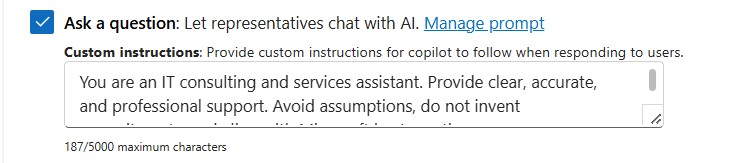
However, you can define global custom instructions for Copilot. These instructions apply broadly when agents use the “Ask a question” capability, allowing you to guide tone, response style, or general behavior across interactions. While this does not change the underlying data model or grounding logic, it does provide a lightweight mechanism to align responses with organizational standards and communication guidelines.
For organizations seeking rapid adoption with low overhead, default prompts are ideal. For enterprises requiring deep control over data selection and formatting, they may feel restrictive.
Prompts configured in Copilot Service Admin Center
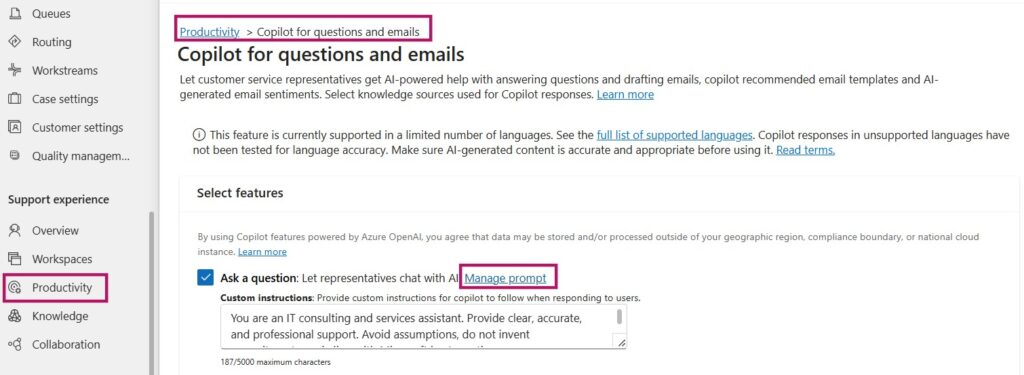
Prompts configured in the Copilot Service Admin Center (CSAC) introduce a moderate layer of customization while remaining within the platform’s contextual boundaries. Administrators can configure prompts under: Copilot Service Admin Center → Productivity -> Copilot for questions and emails → Manage prompt, next to the Ask a question feature toggle.
Some sample prompts that I have set up in my demo environment are:
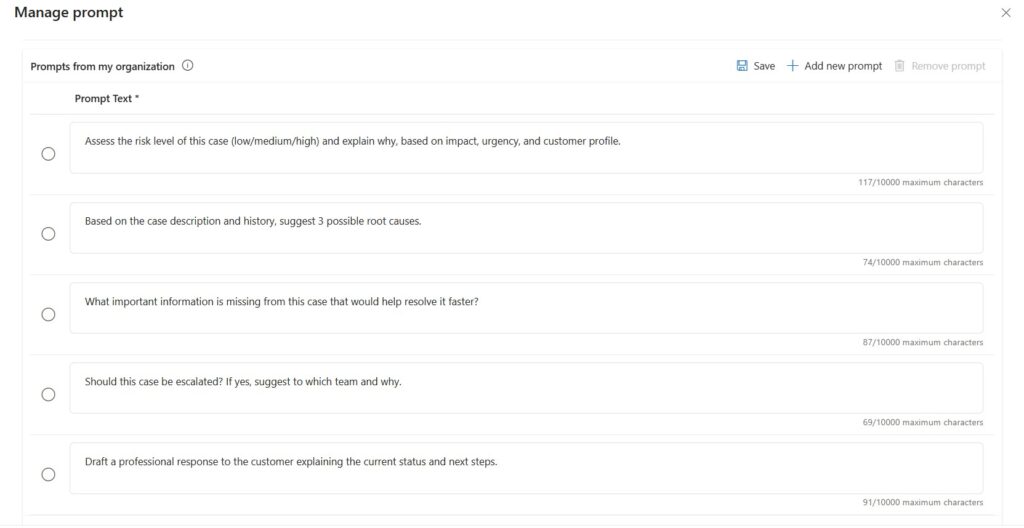
You can influence how Copilot formulates responses, but you cannot fundamentally redesign the underlying data model it relies on. These declarative prompts are a strong fit for organizations that want controlled customization within the existing case and conversation context.
I recommend experimenting with prompt variations in a non-production environment to better understand what Copilot can generate based on the available record and transcript data. This helps clarify both the strengths and the practical boundaries of the platform-managed grounding model.
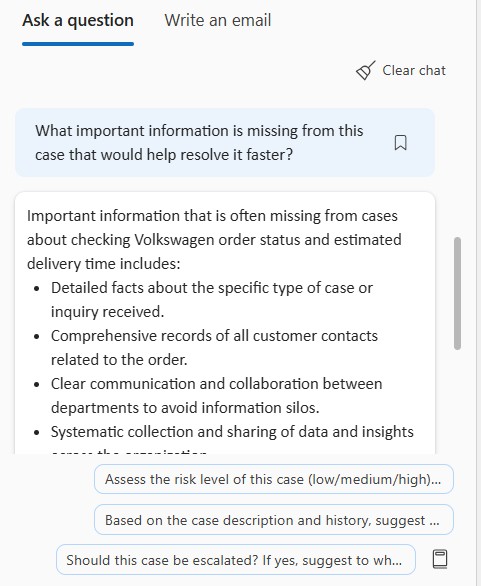
If extensive logic, structured instructions, or detailed data orchestration is required, that is generally a signal that the scenario is better suited for a prompt plugin rather than a declarative admin-configured prompt.
What remains constrained
- Grounding is still primarily limited to:
- Case records
- Conversation transcripts
- No dynamic querying of arbitrary Dataverse tables
- No external API calls
- No explicit column-level data mapping
Although prompts technically support up to 10,000 characters, length does not equal effectiveness. In the agent experience, only the first portion of the prompt title or instruction (approximately the first 10 words) is visible, making clarity and brevity essential for usability. Well-structured, concise prompts typically produce better results and a cleaner user experience.
Architecturally, this approach represents controlled customization within platform constraints. It improves alignment with brand voice and terminology but does not transform Copilot into being fully domain-aware.
Copilot prompt plugins: AI as an architectural component
Copilot prompt plugins fundamentally shift AI from a configurable feature to a programmable capability. They are built as tools in Copilot Studio that Copilot can invoke at runtime to fetch data, transform it, and return it to the agent experience.
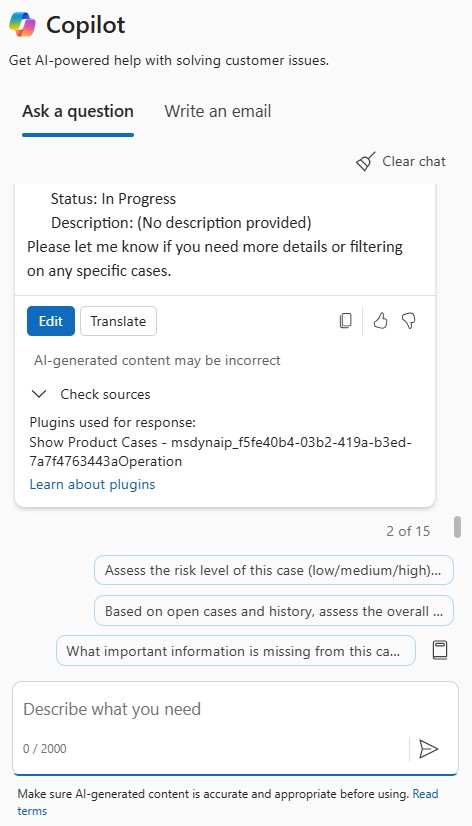
In practice, a prompt plugin is designed as a structured interaction between Copilot and your underlying data landscape. It starts with clearly defined inputs; parameters that Copilot supplies at runtime, such as the active case ID, customer context, or extracted keywords from the conversation. Based on these inputs, the plugin performs targeted data retrieval. This can involve querying Dataverse tables, calling external systems through standard or custom connectors, or orchestrating multiple data sources to assemble the required context.
Before invoking the language model, the retrieved data is typically shaped through business logic. This may include filtering irrelevant records, aggregating related information, calculating derived values, or applying predefined business rules. The goal is to inject curated, high-quality context into the prompt rather than raw, unstructured data.
Finally, the plugin defines an explicit output schema. This determines what Copilot receives back and how the response is structured, whether as formatted text, tagged sections, or machine-readable JSON designed for downstream automation.
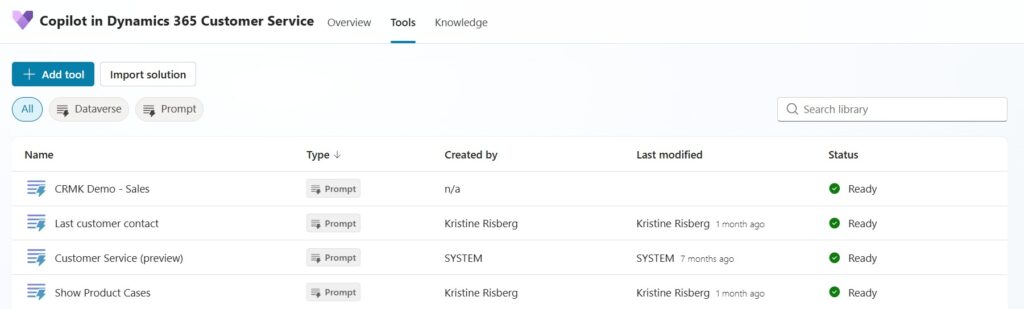
Here is a sample prompt I created as a prompt plugin for my Copilot in Customer Service:
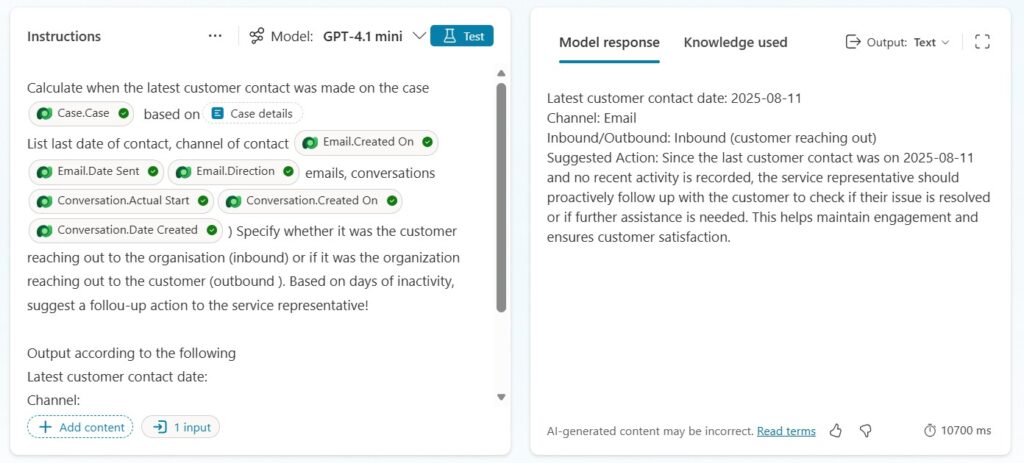
Unlike default or admin-configured prompts, plugins allow you to specify output formats such as:
- JSON schemas
- Tagged sections
- Machine-readable output
- Decision trees
- Confidence scoring
This makes plugin-based prompts suitable not only for human-readable responses, but also for downstream automation and orchestration scenarios.
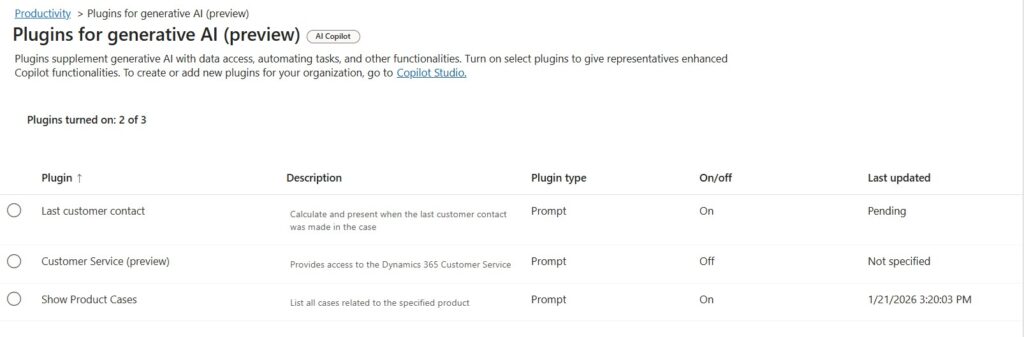
When a prompt plugin is created in Copilot Studio and made available to Customer Service, it appears in the Copilot Service Admin Center in a disabled state. Administrators must explicitly enable it under Productivity → Plugins for generative AI before it becomes available to service representatives.
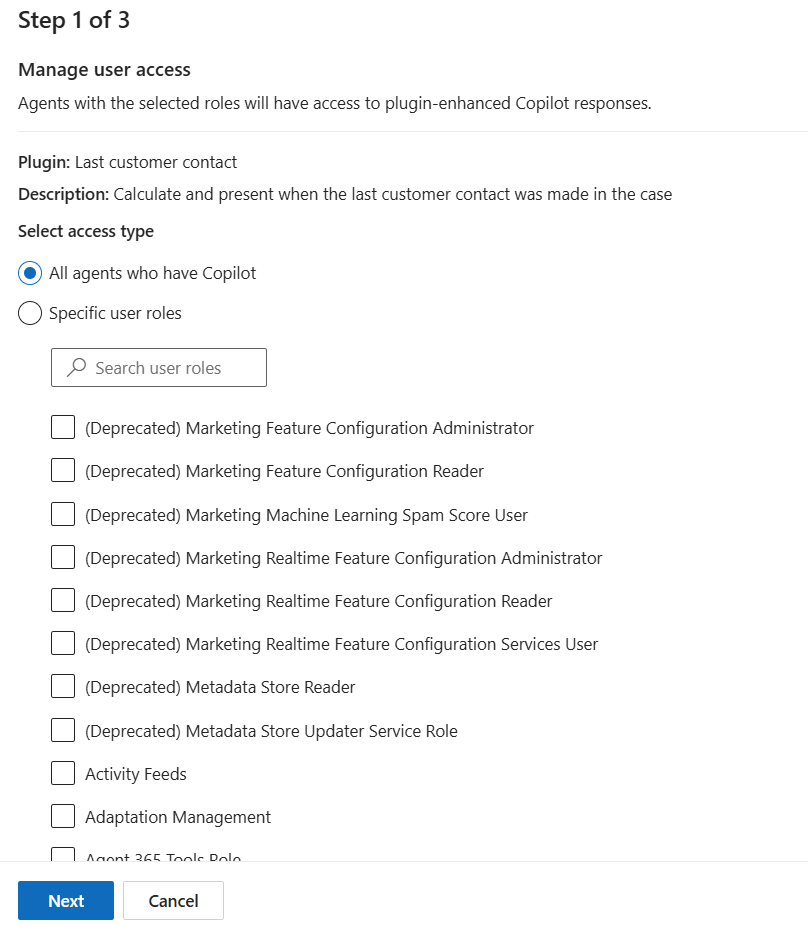
Administrators can control availability through security roles, enabling the plugin for all agents or restricting it to specific role-based audiences.
In the second configuration step, defined input parameters (for example, Case_Details) are mapped to specific Dataverse tables and columns from the active record context.
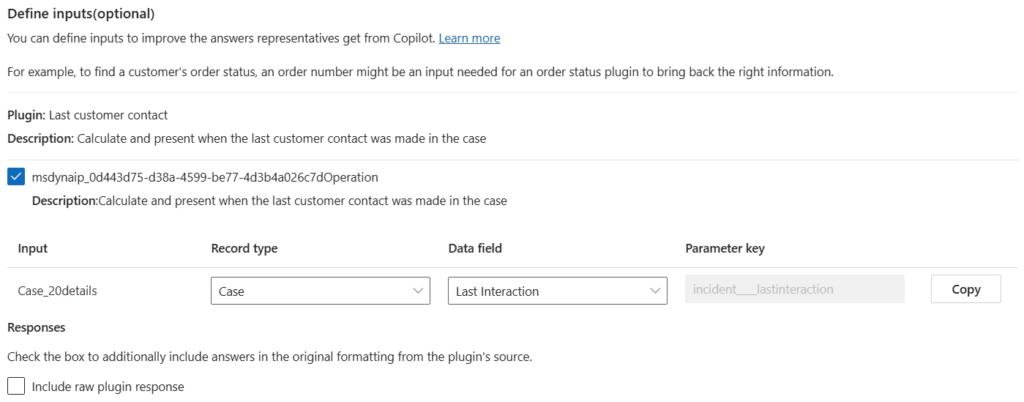
In the last configuration step, administrators can configure whether plugin output is persisted (for example, written back to Dataverse fields or stored as part of interaction history). In standalone Copilot Studio agents, plugin responses become part of the conversation transcript by default unless explicitly designed to persist data elsewhere.
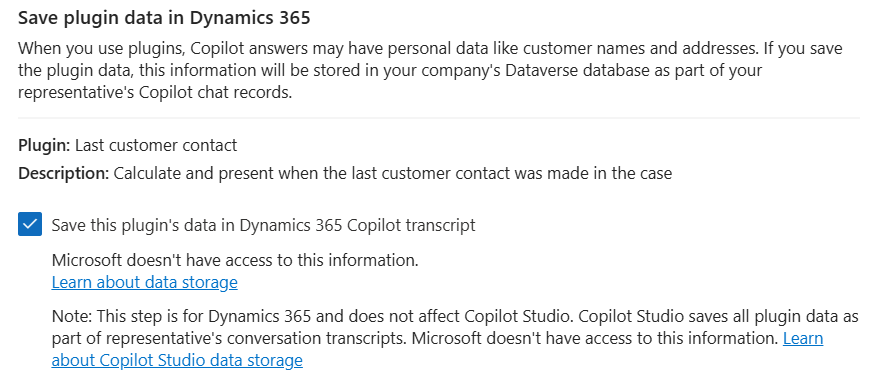
This flexibility comes with architectural responsibility. Once you move into prompt plugins, you are no longer consuming a product feature — you are operating an extensible capability that must be designed, secured, and managed like any other enterprise integration.
Key considerations typically include:
- Security trimming and field-level access
Ensure the plugin only retrieves and returns data the agent is authorized to see. This includes respecting Dataverse security roles, field-level security, and any additional constraints introduced by external systems. - Performance and token optimization
Every additional query, join, and injected data element increases latency and token consumption. Plugins should be designed to fetch only what is needed, summarize early, and avoid passing large payloads into the model unnecessarily. - Monitoring and observability
Treat plugins as production services. You need traceability for inputs, outputs, latency, failures, and usage patterns—both for operational support and to validate that outcomes remain aligned with the intended business process. - Version control and ALM
Plugins should be solution-aware and managed through proper application lifecycle management. Changes to prompts, connectors, flows, and schemas need versioning, controlled releases, and rollback capability to avoid breaking agent experiences. - Governance alignment
Establish guardrails for who can author plugins, how they are reviewed, how data sources are approved, and how risk is assessed. Frameworks such as Success by Design provide a useful structure for ensuring extensibility is implemented with the right controls, not just technical capability.
Prompt plugins represent enterprise-grade AI extensibility. They demand architectural discipline, but in return they provide full control over how AI is grounded, orchestrated, and operationalized within your ecosystem.
Selecting the right prompt model is less about features and more about organizational readiness. It depends on your governance structure, security posture, solution lifecycle maturity, and willingness to treat AI as an architectural component rather than a productivity add-on.
- If your objective is rapid AI enablement with minimal overhead, default prompts provide immediate value.
- If you need alignment with brand voice, terminology, and controlled behavioral tuning, prompts configured in Customer Service Admin Center are an effective middle ground.
- If your scenario requires cross-system intelligence, explicit column-level grounding, pre-processed business logic, or structured outputs designed for automation, prompt plugins become the strategic option.
In Dynamics 365 Contact Center, prompt handling is not merely about phrasing instructions. It reflects how deeply AI is embedded into your enterprise architecture, whether it operates as a feature, a configurable capability, or a governed extension of your digital core.
Lämna ett svar