
One of the most interesting new additions to Dynamics 365 Contact Center is the Service Operations Agent. It promises a more conversational way for administrators to configure, validate, and troubleshoot contact center setup. Instead of navigating through every admin screen manually, you can ask the agent to help create or inspect configuration across workstreams, channels, queues and user setup areas.
I recently tested the Service Operations Agent across a few practical configuration scenarios:
- Creating a new workstream
- Creating a chat channel
- Creating an outbound voice queue
- Attempting to configure inbound voice behavior through profiles, queue assignment, and capacity-related settings
The experience was promising, but also a good reminder that AI-assisted administration still requires an administrator who understands the underlying platform.
Tested scenarios and outcomes
Testing scenario: Workstream and chat channel configuration
I tested creating a new workstream and chat channel using the Service Operations Agent. I also asked the agent to create a new chat channel in an already existing workstream, without providing the exact workstream name or GUID.
Outcome: The agent was able to work with channel and workstream-related configuration, but precision mattered. When I asked it to use the existing workstream, it created a new workstream instead. That workstream was not visible in the main workstream list and could only be accessed by navigating from the chat channel to the related workstream. This showed that the agent can support simpler setup tasks, but that it should not be expected to infer the correct existing record unless the instruction is very specific.
Testing scenario: Outbound voice queue configuration
I tested creating an outbound voice queue by providing the Service Operations Agent with the required prerequisites and setup details. After the queue was created, I asked the agent to update the assignment method on that same queue.
Outcome: The agent initially created the outbound voice queue with the information I provided. However, when I asked it to update the assignment method, it created a new queue instead of modifying the existing one. This highlighted the importance of clearly stating whether the agent should create a new record or update an existing one. For updates, the exact queue name, and ideally the record ID, should be included.
Testing scenario: Inbound profile and routing-related configuration
I tested whether the Service Operations Agent could help create or configure an inbound profile linked to a queue and capacity profile, with the goal of controlling incoming call behavior and determining which users could receive those calls.
Outcome: The agent appeared to be limited when it came to more granular configuration. It could support higher-level channel, workstream, and queue setup, but not all detailed routing, capacity, or profile-related settings seemed available through the agent’s actions.
This suggests that some configuration areas still need to be handled manually, especially where the setup depends on more detailed behavior, relationships, or settings that may not be exposed through the API.
During testing, I also needed to leave the Service Operations Agent chat to verify configuration, check existing records, and look up IDs or related setup details in Copilot Service admin center. The agent chat is located in a separate section, so verifying records requires some back and forth between the chat and the admin configuration pages. However, the chat history remained available when returning to the agent, which made it easy to continue the same conversation thread. This made the experience workable, but it also showed that the agent is most effective when the administrator already knows where to validate the resulting configuration.
What worked well and where the limits appeared
The Service Operations Agent worked well for simpler, high-level configuration tasks. It understood the general intent and could either guide me through the steps or perform parts of the configuration. The clearest example was creating an outbound voice queue. I provided the basic prerequisites, and the agent created the queue with the details I had given it. In that scenario, it felt useful because it turned a configuration request into action without requiring me to manually navigate through every setup screen.
The limitations became visible when I moved into more granular configuration. This is where the agent struggled. My impression is that it can work with configuration areas exposed through the API and the supported agent experience, but not necessarily with the deeper settings in the configuration model. It may understand the request conceptually, but that does not always mean it can perform the exact configuration change.
That distinction is important. The agent can be helpful, but its output still needs to be validated by someone who understands the platform.
It is also worth noting that the Service Operations Agent connects through the D365 Contact Center Admin MCP Server, which appears when the agent needs permission to retrieve or validate configuration using the signed-in user’s credentials.
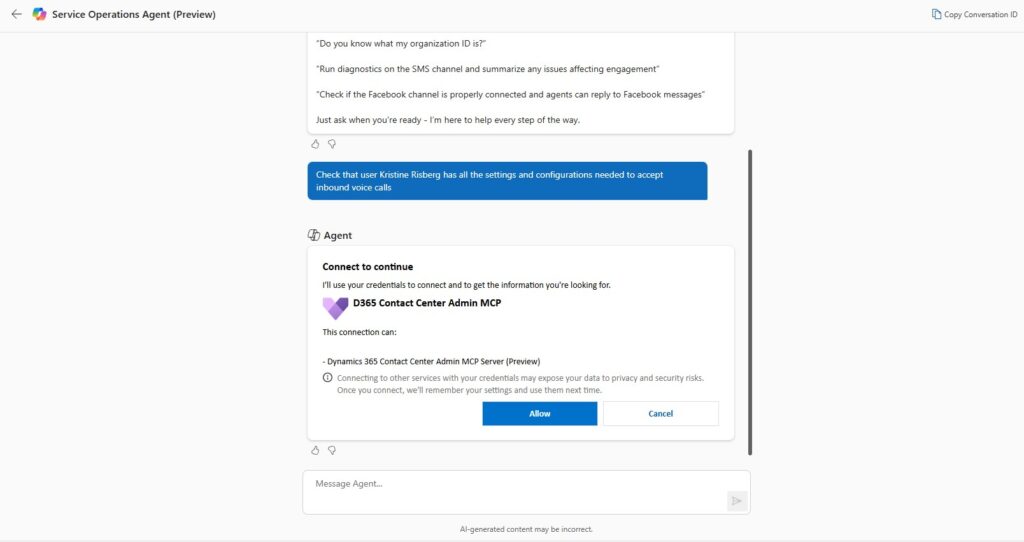
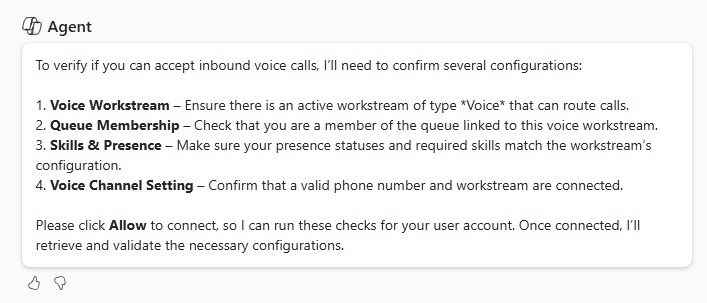
It is not freely navigating every part of the admin experience; it can only work through the tools, services, and configuration access exposed to it. If a setting is not available through that layer, the agent may understand the request but still be unable to complete the exact configuration change.
Be explicit about what should not happen
One conclusion from this test is that prompts for administrative agents need to include constraints, not only desired outcomes. It is not enough to say: “Add this chat channel to the existing workstream.”
A better instruction would be: “Use the existing workstream named ‘X’. Do not create a new workstream. If you cannot find that exact workstream, stop and ask me for clarification.”
I would recommend using prompts that include the following details:
- The exact name of the record to update
- The GUID where possible
- Whether the agent is allowed to create new records
- Whether the request is an update or a new setup
- What the agent should do if it cannot find the exact record
- What should be validated before changes are made
For example: “Update the existing queue named ‘Outbound Voice Queue’. Do not create a new queue. Change the assignment method to least active. If this setting cannot be updated by you, tell me that instead of creating a new queue.”
Or: “Create a chat channel and link it to the existing workstream named ‘Customer Support Chat’. Do not create a new workstream. If you cannot find that workstream, stop and ask me for the workstream ID.”
This felt a bit unnatural to me at first, but having used conversational agents when working with business data you should be familiar with prompting stating both action and guardrails to reduce the risk of unintended configuration.
The agent still needs a knowledgeable user
My main takeaway is not that the Service Operations Agent is bad. It is that the user still needs to understand Dynamics 365 Contact Center configuration well enough to judge the answer.
The agent can help accelerate tasks, but it does not remove the need for platform knowledge. You still need to know:
- Which records should exist
- Which configuration belongs to a workstream, channel, queue, profile, or routing setup
- When a new record is expected
- When a duplicate record is a problem
- Which settings should be validated manually
- Whether the answer from the agent makes sense in the context of your environment
There is also an ALM aspect to consider. In a managed implementation, configuration should not always be created directly in the target environment. Some configuration data may need to be included in a solution, moved through pipelines, and validated as part of the deployment process. This means the administrator also needs to understand which parts of the contact center setup are environment-specific operational data, and which parts should be treated as deployable configuration. If the agent creates or changes records directly in an environment, you still need to consider how those changes fit into your overall solution management and release process.
This is especially important in contact center configuration, where small setup differences can have a big impact on routing behavior, representative capacity, and customer experience.
Where I would use it today
Based on this test, I would use the Service Operations Agent for three main scenarios.
1. Simpler configuration tasks
For straightforward setup, the agent can save time. Creating basic channels, workstreams, or queues may be faster through a conversational interface, especially when the request is clear and the objects involved are unambiguous. I would still (always!) validate the result afterwards, but I can see the value for accelerating repetitive setup.
2. Sanity checks of existing configuration
The agent is useful as a second pair of eyes. Asking it to review or explain configuration can help identify missing pieces or confirm how something is set up. This is particularly useful when working in environments where configuration has changed over time, or where multiple people have been involved in setup.
3. Bulk updates and repetitive admin tasks
The agent could be valuable for repetitive operational updates, such as user skills, queue assignments, profiles, or similar configuration areas, provided that the instructions are precise and the results are validated. Many contact center admin tasks are not conceptually difficult, but they are repetitive and easy to get wrong manually. If the agent can safely handle these updates with clear confirmation steps, it could become a real productivity booster.
Final thoughts
The Service Operations Agent is a promising addition to Dynamics 365 Contact Center. It can help administrators move faster, especially with simpler setup and repetitive configuration tasks.
But my testing also showed that it is not something I would use blindly and the agent should only be used by someone who understands the platform. It can create configuration, but it may not always update the intended existing record unless the instruction is very specific. It can work with channels and workstreams, but more granular settings may still require manual configuration. It can provide helpful answers, but those answers still need to be challenged and verified. For now, I see Service Operations Agent as an accelerator, not an autopilot. Used responsibly, it can reduce admin effort and help validate configuration. Used carelessly, it can create duplicate records, unexpected setup, or a false sense of completion.
Lämna ett svar